Developer Testing Guide
For Developers Only
This guide is for TinyTorch contributors and maintainers. Students should use tito module commands.
Purpose: Complete guide to TinyTorch’s testing infrastructure. Understand the test hierarchy, run specific test types, and validate releases.
Test Hierarchy Overview
TinyTorch uses a progressive testing hierarchy that mirrors how the framework builds from simple components to full functionality:
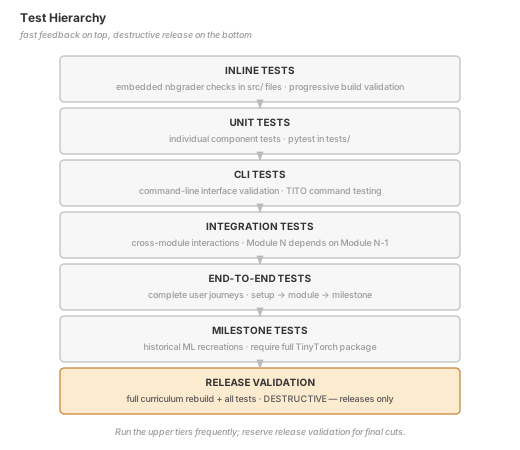
Quick Reference
| Flag | What It Tests | When to Use |
|---|---|---|
--inline |
Embedded tests in src/*.py |
After editing module source code |
--unit |
Pytest unit tests | Quick validation during development |
--cli |
CLI command tests | After modifying TITO commands |
--integration |
Cross-module tests | After changes affecting multiple modules |
--e2e |
End-to-end journeys | Before merging major features |
--milestone |
Historical ML tests | After full package changes |
--all |
Everything except release | Before pushing to dev branch |
--release |
Full destructive validation | Before releases only |
The tito dev test Command
All testing is unified under a single command with specific flags:
# Default: runs unit tests only
tito dev test

# Run specific test types
tito dev test --inline         # Module source tests (progressive)
tito dev test --unit           # Pytest unit tests
tito dev test --cli            # CLI tests
tito dev test --integration    # Integration tests
tito dev test --e2e            # End-to-end tests
tito dev test --milestone      # Milestone tests

# Run all tests (except release)
tito dev test --all

# Full release validation (DESTRUCTIVE)
tito dev test --release
Combining Flags
You can combine multiple flags:
# Run unit and CLI tests
tito dev test --unit --cli

# Run inline and integration tests
tito dev test --inline --integration
Module-Specific Testing
Test a specific module with the --module flag (or -m shorthand):
# Run inline tests for module 06 only
tito dev test --inline --module 06

# Run unit tests for module 03
tito dev test --unit --module 03

# Shorthand works too
tito dev test --inline -m 06
CI Mode
For automation, use --ci for JSON output:
tito dev test --all --ciTest Types Explained
1. Inline Tests (--inline)
What: Embedded tests inside src/XX_module/XX_module.py files using nbgrader format.
Why: These are the student-facing tests that validate each module’s implementation before export.
How It Works: 1. Runs tito module complete for each module progressively 2. Module N requires modules 1 to N-1 to be already exported 3. Each module’s inline tests must pass before proceeding
Example inline test in source:
# %% nbgrader={"grade": true, "grade_id": "tensor_creation", "locked": true, "points": 5}
# Test tensor creation
t = Tensor([1, 2, 3])
assert t.shape == (3,), "Shape should be (3,)"
assert t.data[0] == 1, "First element should be 1"
When to run: After editing any src/ file to ensure student tests still pass.
2. Unit Tests (--unit)
What: Pytest tests in tests/01_tensor/, tests/02_activations/, etc.
Why: Additional validation beyond inline tests. May test edge cases, error handling, or implementation details not covered in student exercises.
Location: tinytorch/tests/ directory structure mirrors module structure.
When to run: Default test type. Run frequently during development.
3. CLI Tests (--cli)
What: Tests for the TITO command-line interface.
Why: Ensures all CLI commands work correctly, help text is consistent, and user-facing behavior is stable.
Location: tinytorch/tests/cli/
When to run: After modifying any command in tito/commands/.
4. Integration Tests (--integration)
What: Tests that verify cross-module functionality.
Why: Module 2 depends on Module 1. Integration tests ensure the dependencies work correctly together.
Location: tinytorch/tests/integration/
Example: Testing that Tensor from Module 1 works correctly with Linear from Module 5.
When to run: After changes that might affect module interactions.
5. End-to-End Tests (--e2e)
What: Complete user journey tests.
Why: Validates the entire workflow a student or developer would follow.
Location: tinytorch/tests/e2e/
Example journeys tested: - Fresh setup → module start → module complete - Module completion → milestone run - Progress tracking across sessions
When to run: Before merging significant features.
6. Milestone Tests (--milestone)
What: Tests that validate the historical ML milestone scripts.
Why: Milestones are key student checkpoints. They MUST work reliably.
Location: tinytorch/tests/milestones/
Milestones tested: 1. Perceptron (1958) - First neural network 2. XOR Crisis (1969) - Multi-layer networks 3. MLP Revival (1986) - Backpropagation 4. CNN Revolution (1998) - Spatial networks 5. Transformer Era (2017) - Attention mechanism 6. MLPerf (2018) - Optimization techniques
Requirements: All modules must be exported to tinytorch/core/ before milestone tests can run.
When to run: After any changes to core TinyTorch functionality.
7. All Tests (--all)
What: Runs inline, unit, cli, integration, e2e, and milestone tests.
Why: Comprehensive validation without the destructive reset of release validation.
When to run: Before pushing to the dev branch or creating PRs.
8. Release Validation (--release)
What: Full curriculum rebuild and validation.
Why: Ensures a fresh installation would work correctly.
This is DESTRUCTIVE. It will:
- Reset all progress tracking
- Clean the
tinytorch/core/directory - Export each module from scratch
- Run all test types
- Execute all milestones
When to run: Only before releases. Never run casually.
CI/CD Integration
The GitHub Actions workflow supports all test types:
# .github/workflows/tinytorch-validate-dev.yml

# Quick tests on every push
- name: Run Quick Tests
  run: tito dev test --unit --cli

# Full tests on PR to dev
- name: Run Full Tests
  run: tito dev test --all

# Release validation (manual trigger only)
- name: Release Validation
  run: tito dev test --release
Test Directory Structure
tinytorch/
├── tests/
│   ├── 01_tensor/           # Unit tests for Module 01
│   ├── 02_activations/      # Unit tests for Module 02
│   ├── ...
│   ├── cli/                 # CLI command tests
│   │   ├── test_cli_execution.py
│   │   ├── test_cli_help_consistency.py
│   │   └── test_cli_registry.py
│   ├── integration/         # Cross-module tests
│   ├── e2e/                 # End-to-end journey tests
│   │   └── test_user_journey.py
│   └── milestones/          # Milestone script tests
│       └── test_milestones_run.py
└── src/
    ├── 01_tensor/
    │   └── 01_tensor.py     # Contains inline tests
    ├── 02_activations/
    │   └── 02_activations.py
    └── ...
Common Workflows
Daily Development
# Quick validation while coding
tito dev test --unit

# After editing a module
tito dev test --inline --module 06

# Before committing
tito dev test --unit --cli
Feature Development
# After implementing a feature
tito dev test --unit --integration

# Before creating PR
tito dev test --all
Pre-Release
# Full validation (in clean environment)
tito dev test --release
Troubleshooting
“Module XX not found”
Cause: The module hasn’t been exported yet.
Solution: Run tito module complete XX or tito dev export XX first.
Milestone tests fail with import errors
Cause: Not all required modules are exported.
Solution: Run tito dev test --inline first to progressively build all modules.
Tests pass locally but fail in CI
Cause: CI starts fresh without exported modules.
Solution: Ensure CI workflow runs module export before tests.