Module 18: Memoization
Autoregressive inference recomputes the same attention keys and values for every new token, billions of times across a production fleet. The KV cache is the memoization trick that turns that O(N^2) redundancy into O(N) by trading GPU HBM for saved compute. This module builds a contiguous, preallocated cache and explains the fragmentation problem at long context that makes production systems reach for PagedAttention.
OPTIMIZATION TIER | Difficulty: ●●○○ | Time: 3-5 hours | Prerequisites: 01-14
Prerequisites: Modules 01-14 means you should be comfortable with:
- Tensor operations, matrix multiplication, and shape manipulation (Module 01)
- Transformer architectures and attention (Modules 12-13)
- Profiling tools (Module 14) to measure speedup
If you understand how transformers compute attention and why it’s expensive, you’re ready to learn how caching trades memory for recomputation, and how to measure whether it pays off.
Overview
When ChatGPT writes a 100-word response, the naive transformer would recompute the keys and values for every previous token at every step, doing 5,050 K,V projections to produce 100 tokens. Almost all of that work is duplicate. Memoize it once and the cost collapses to 100.
KV caching stores the key and value matrices from past tokens so each new token only computes its own. Across n token positions, this reduces K,V projection work from O(n²) to O(n). Attention still reads the growing history: its work per new token is O(n), and total attention work remains O(n²). End-to-end speedup depends on the workload and implementation.
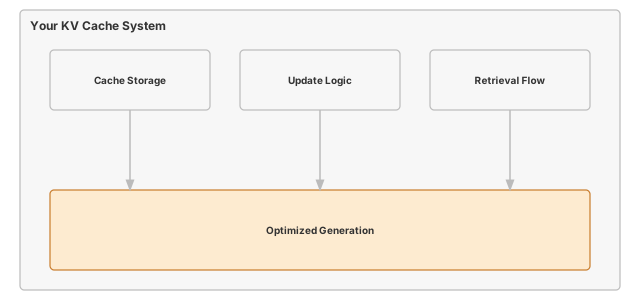
In this module you build that cache. By the end you will have a KVCache class with O(1) updates, a non-invasive hook that retrofits caching onto an existing transformer, and a quantitative grasp of the memory-versus-compute trade you just bought.
Commands
# first time
tito module start 18

# later sessions
tito module resume 18

# when your tests pass
tito module complete 18
Your notebook is modules/18_memoization/memoization.ipynb.
Learning objectives
- Implement the KVCache update and lookup methods that give the cache its O(1) append and its efficient memory reuse
- Measure the memory-compute trade-off: accepting O(n) cache storage to reduce K,V projection work from O(n²) to O(n)
- Understand why attention still reads a growing history after K,V projections are cached
- Connect your implementation to production systems like ChatGPT and Claude that rely on KV caching
What you’ll build
The pattern you’ll enable:
from tinytorch.perf.memoization import enable_kv_cache, _cached_generate

cache = enable_kv_cache(model)
# The teaching helper resets the cache and opens its generation context.
output = _cached_generate(model, prompt_tokens, max_new_tokens=100,
                          temperature=0.0, cache=cache)
What you’re not building yet
To keep this module focused, you will not implement:
- Multi-batch cache management (production systems handle thousands of concurrent sequences)
- Cache eviction strategies (handling sequences longer than max_seq_len)
- GPU memory optimization (production uses memory pools and paging)
- Speculative decoding (advanced technique that builds on KV caching)
You are building the core memoization mechanism. Advanced cache management comes in production deployment.
What you write
The notebook arrives with the surrounding code already written and explained. You write 2 functions, each marked # YOUR CODE HERE and followed by a test cell:
KVCache.update- Update cache with new key-value pairs for given layer.
KVCache.get- Retrieve cached key-value pairs for attention computation.
How you know it works
tito module complete stops at the first step that fails:
- the unit tests inside your notebook run;
- your code is exported into
tinytorch.perf.memoization; - the integration tests run against that exported package, together with the modules before it;
- the module is recorded as done, and
tito module statusshows it.
Unit tests in your notebook (5). Each prints a ✅ line when it passes.
- KVCache Implementation
- _create_cache_storage
- CachedAttention
- _cached_generate
- Non-Invasive Cache Integration
Integration tests after export (1).
tests/18_memoization/test_18_memoization_progressive.py
When it fails
A bare NotImplementedError with no message means a cell reached a function you have not written yet: the notebook ships each one as # YOUR CODE HERE followed by raise NotImplementedError(). The messages below are ones this module actually prints when an implementation is present but wrong.
Before advance, cache should be empty-
From
test_unit_kvcache.getreturned the whole preallocated buffer. Slice it to the filled positions,[:, :, :seq_pos, :]. Cached output at position 1 differs from uncached causal attention-
From
test_unit_cached_attention.updatewrote every token to the same slot. Write at the current position,[:, :, seq_pos:seq_pos + 1, :].
Finished? Read why
The reasoning behind this module (why it is built this way, what it costs, and how production frameworks differ) is the chapter The KV Cache: Remembering Keys and Values During Generation in the companion book, TinyTorch: From Tensors to Transformers (PDF). The book prints complete reference implementations, so read it after you finish the module, not while you are working on it.
What’s next
You have eliminated repeated K,V projections. Measuring total generation time will establish whether those savings outweigh cache overhead. To put a real number on what you just built — and to compare it against the other optimizations in this tier — you need disciplined measurement.
Module 19 builds the measurement infrastructure that lets you say “this optimization gave us 12.4x speedup with 95% confidence” instead of “it seems faster”. You’ll implement statistical timing, warm-up handling, and Pareto-frontier analysis — the same tools production teams use to validate every optimization in this book, including the KV cache you just wrote.
Next: Module 19: Benchmarking
How this module relates to the rest of the tier
| Module | What It Does | Works with Memoization |
|---|---|---|
| 15: Quantization | Reduce precision to save memory | Lower-precision caches are an extension; this cache stores float32 |
| 17: Acceleration | Optimize computation kernels | Compare kernel improvements with saved projection work |
| 19: Benchmarking | Measure end-to-end performance | Profile cache hit rates and speedup gains |