Module 10: Tokenization
A language model never sees text. It sees token IDs. The vocabulary you pick upstream silently caps sequence length, embedding-table size, and every attention cost downstream. That single design choice is the first systems decision of the language stack.
ARCHITECTURE TIER | Difficulty: ●●○○ | Time: 4-6 hours | Prerequisites: 01-08
You should have completed the Foundation tier:
- Tensor operations (Module 01)
- Basic neural network components (Modules 02-04)
- Training fundamentals (Modules 05-07)
Tokenization stands largely on its own — it works with strings and dictionaries, not gradients. If you can manipulate Python strings, you’re ready.
Overview
Text isn’t the input to a language model. Tokens are. Before a single matrix multiply happens inside GPT, every character of your prompt has already been chopped, merged, and looked up in a fixed vocabulary — and that one upstream choice silently decides how long your sequences are, how big your embedding table is, and how much an inference call costs.
In this module you build two tokenizers from scratch: a character-level tokenizer (one character, one token) and a Byte Pair Encoding (BPE) tokenizer that learns subword units from data. Doing both surfaces the central trade-off: small vocabularies yield long sequences and tiny embedding tables; large vocabularies yield short sequences but multi-megabyte embeddings. Attention cost scales quadratically with sequence length, so this trade is rarely close.
By the end you can explain why GPT uses ~50,000 tokens, how tokenizers degrade gracefully on unknown words, and how the vocabulary you pick today caps the throughput of every model you train tomorrow.
Commands
# first time
tito module start 10

# later sessions
tito module resume 10

# when your tests pass
tito module complete 10
Your notebook is modules/10_tokenization/tokenization.ipynb.
Learning objectives
- Implement the pair-counting and pair-merging steps that drive BPE toward efficient subword representation, and read the supplied character-level tokenizer that trades that efficiency for robust text coverage
- Understand the vocabulary size versus sequence length trade-off and its impact on memory and computation
- Master encoding and decoding operations that convert between text and numerical token IDs
- Connect your implementation to production tokenizers used in GPT, BERT, and modern language models
What you’ll build
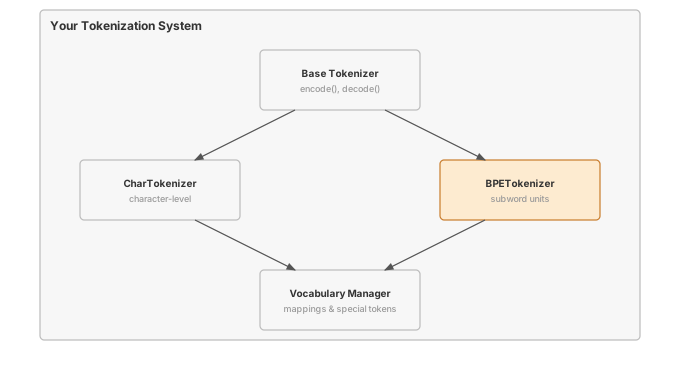
The pattern you’ll enable:
# Converting text to numbers for neural networks
tokenizer = BPETokenizer(vocab_size=1000)
tokenizer.train(corpus)
token_ids = tokenizer.encode("Hello world")  # e.g. [142, 587, 23]; every ID < vocab_size
What you’re not building yet
To keep this module focused, you will not implement:
- GPU-accelerated tokenization (production tokenizers use Rust/C++)
- Advanced segmentation algorithms (SentencePiece, Unigram models)
- Language-specific preprocessing (Unicode normalization, byte-level fallback)
- Tokenizer serialization and loading (Hugging Face tokenizers handle this with
save_pretrained())
You are building the conceptual foundation. Production optimizations come later.
What you write
The notebook arrives with the surrounding code already written and explained. You write 2 functions, each marked # YOUR CODE HERE and followed by a test cell:
_count_byte_pairs- Count frequency of all adjacent token pairs across all words.
_merge_pair- Merge one pair everywhere it occurs in all word token lists.
How you know it works
tito module complete stops at the first step that fails:
- the unit tests inside your notebook run;
- your code is exported into
tinytorch.core.tokenization; - the integration tests run against that exported package, together with the modules before it;
- the module is recorded as done, and
tito module statusshows it.
Unit tests in your notebook (6). Each prints a ✅ line when it passes.
- Base Tokenizer Interface
- Character Tokenizer
- Count Byte Pairs
- Merge Pair
- BPE Tokenizer
- Tokenization Utilities
Integration tests after export (5).
tests/10_tokenization/test_10_tokenization_progressive.py
When it fails
A bare NotImplementedError with no message means a cell reached a function you have not written yet: the notebook ships each one as # YOUR CODE HERE followed by raise NotImplementedError(). The messages below are ones this module actually prints when an implementation is present but wrong.
Expected 4, got 2-
From
test_unit_count_byte_pairs. Pairs were counted once per word. Each word occursfreqtimes in the corpus, so addfreqfor every pair. Expected ['he', 'l', 'l', 'o'+TOK_EOW], got ['he', 'e', 'l', 'l', 'o ']-
From
test_unit_merge_pair. After a merge the scan advanced by one, so the second symbol of the pair was reused. Advance by two after merging. Expected 1, got 0-
From
test_unit_count_byte_pairs. The last pair of each word was skipped. Adjacent pairs run overrange(len(tokens) - 1).
Finished? Read why
The reasoning behind this module (why it is built this way, what it costs, and how production frameworks differ) is the chapter Byte-Pair Encoding: Compressing Language into Subword Tokens in the companion book, TinyTorch: From Tensors to Transformers (PDF). The book prints complete reference implementations, so read it after you finish the module, not while you are working on it.
What’s next
You now have integer token IDs. Integers, however, are opaque: ID 142 and ID 143 are no more related than ID 142 and ID 9,001. The next module turns those IDs into learnable dense vectors so that “king” and “queen” can sit close together in space, and so that gradients can actually flow through your model. The vocabulary you fixed in this module sets the number of rows in that embedding table — and therefore the bulk of the parameters at the input of every transformer you’ll build.
Next: Module 11: Embeddings
How later modules use this one
| Module | What It Does | Your Tokenization In Action |
|---|---|---|
| 11: Embeddings | Learnable lookup tables | embedding = Embedding(vocab_size=1000, embed_dim=128) |
| 12: Attention | Context mixing across a sequence | Token sequences attend to each other |
| 13: Transformers | Complete language models | Full pipeline: tokenize → embed → attend → predict |