Module Workflow
Build ML Systems from Scratch
The core workflow for implementing and exporting TinyTorch modules
Purpose: Master the module development workflow - the heart of TinyTorch. Learn how to implement modules, export them to your package, and validate with tests.
The Core Workflow
TinyTorch follows a simple build-export-validate cycle:
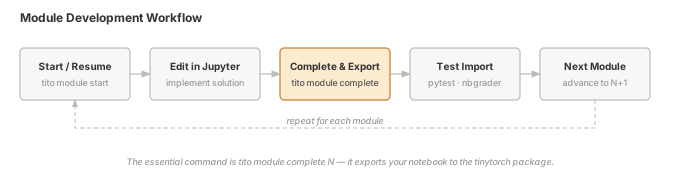
The essential command: tito module complete XX - exports your code to the TinyTorch package
Follow this workflow to build ML systems from scratch.
Essential Commands
Check Environment
tito system health
Verify your setup is ready before starting
Start a Module (First Time)
tito module start 01
Opens Jupyter Lab for Module 01 (Tensor)
Resume Work (Continue Later)
tito module resume 01
Continue working on Module 01 where you left off
Export & Complete (Essential)
tito module complete 01
Export Module 01 to TinyTorch package - THE key command
Check Progress
tito module status
See which modules you've completed
Typical Development Session
Here’s what a complete session looks like:
1. Start Session
cd tinytorch
source .venv/bin/activate
tito system health # Verify environment
2. Start or Resume Module
# First time working on Module 03
tito module start 03

# OR: Continue from where you left off
tito module resume 03
This opens Jupyter Lab with the module notebook.
3. Edit in Jupyter Lab
# In the generated notebook
class Linear:
 def __init__(self, in_features, out_features):
 # YOUR implementation here
 ...
Work interactively: - Implement the required functionality - Add docstrings and comments - Run and test your code inline - See immediate feedback
4. Export to Package
# From repository root
tito module complete 03
This command: - Runs tests on your implementation - Exports code to tinytorch/nn/layers.py - Makes your code importable - Tracks completion
5. Test Your Implementation
# Your code is now in the package!
python -c "from tinytorch import Linear; print(Linear(10, 5))"
6. Check Progress
tito module statusSystem Commands
Environment Health
Check Setup (Run This First)
tito system healthVerifies: - Virtual environment activated - Dependencies installed (NumPy, Jupyter, Rich) - TinyTorch in development mode - All systems ready
Output:
 Environment validation passed
 • Virtual environment: Active
 • Dependencies: NumPy, Jupyter, Rich installed
 • TinyTorch: Development mode
System Information
tito system infoShows: - Python version - Environment paths - Package versions - Configuration settings
Start Jupyter Lab
tito system jupyterConvenience command to launch Jupyter Lab from the correct directory.
Module Lifecycle Commands
List Available Modules
tito module listWhat this does: Shows all 20 modules with names and tier groupings.
Start a Module (First Time)
tito module start 01What this does: 1. Opens Jupyter Lab for Module 01 (Tensor) 2. Shows module README and learning objectives 3. Provides clean starting point 4. Creates backup of any existing work
Example:
tito module start 05 # Start Module 05 (DataLoader)Jupyter Lab opens with the generated notebook for Module 05
Resume Work (Continue Later)
tito module resume 01What this does: 1. Opens Jupyter Lab with your previous work 2. Preserves all your changes 3. Shows where you left off 4. No backup created (you’re continuing)
Use this when: Coming back to a module you started earlier
View a Module (Read-Only)
tito module view 01What this does: Opens the module notebook in Jupyter Lab without updating any status tracking. Useful for reviewing a module you’ve already completed or browsing ahead.
Difference from start/resume: No progress tracking changes, no backup creation.
Complete & Export (Essential)
tito module complete 01THE KEY COMMAND - This is what makes your code real!
What this does: 1. Tests your implementation (inline tests) 2. Exports to tinytorch/ package 3. Tracks completion in .tito/progress.json 4. Makes read-only exported files (protection)
Example:
tito module complete 05 # Export Module 05 (DataLoader)After exporting:
# YOUR code is now importable!
from tinytorch.autograd import backward
from tinytorch import Tensor

# Use YOUR implementations
x = Tensor([[1.0, 2.0]], requires_grad=True)
y = x * 2
y.backward()
print(x.grad) # Uses YOUR autograd!
Test a Module (Without Exporting)
tito module test 01What this does: Runs inline, pytest, and integration tests for a module without exporting or updating progress. Useful for checking your work before committing to complete.
Options: - --all — Test all modules - --verbose / -v — Show detailed output - --unit-only — Skip integration tests - --stop-on-fail — Stop at first failure
View Progress
tito module statusShows: - Which modules (01-20) you’ve completed - Completion dates - Next recommended module
Example Output:
 Module Progress

 Module 01: Tensor (completed 2025-11-16)
 Module 02: Activations (completed 2025-11-16)
 Module 03: Layers (completed 2025-11-16)
 Module 04: Losses (not started)
 Module 05: DataLoader (not started)

Progress: 3/20 modules (15%)

Next: Complete Module 04 to continue Foundation Tier
Reset Module (Advanced)
tito module reset 01What this does: 1. Creates backup of current work 2. Unexports from tinytorch/ package 3. Restores module to clean state 4. Removes from completion tracking
Use this when: You want to start a module completely fresh
Warning: This removes your implementation. Use with caution!
Understanding the Export Process
When you run tito module complete XX, here’s what happens:
Step 1: Validation
 Validating Python syntax
 Running inline tests
Step 2: Export
 Converting src/XX_name/XX_name.py
 → modules/XX_name/XX_name.ipynb (notebook)
 → tinytorch/path/name.py (package)
 Adding "DO NOT EDIT" warning
 Making file read-only
Step 3: Tracking
 Recording completion in .tito/progress.json
 Updating module status
Step 4: Success
 Module XX complete!
 Your code is now part of TinyTorch!

 Import with: from tinytorch import YourClass
Module Structure
Development Structure
src/ ← Developer source code
├── 01_tensor/
│ └── 01_tensor.py ← SOURCE OF TRUTH (devs edit)
├── 02_activations/
│ └── 02_activations.py ← SOURCE OF TRUTH (devs edit)
└── 03_layers/
 └── 03_layers.py ← SOURCE OF TRUTH (devs edit)

modules/ ← Generated notebooks (students use)
├── 01_tensor/
│ └── tensor.ipynb ← AUTO-GENERATED for students
├── 02_activations/
│ └── activations.ipynb ← AUTO-GENERATED for students
└── 03_layers/
 └── layers.ipynb ← AUTO-GENERATED for students
Where Code Exports
tinytorch/
├── core/
│ └── tensor.py ← AUTO-GENERATED (DO NOT EDIT)
├── nn/
│ ├── activations.py ← AUTO-GENERATED (DO NOT EDIT)
│ └── layers.py ← AUTO-GENERATED (DO NOT EDIT)
└── ...IMPORTANT: Understanding the flow - Developers: Edit src/XX_name/XX_name.py → Run tito dev export → Generates notebooks & package - Students: Work in generated modules/XX_name/XX_name.ipynb notebooks - Never edit tinytorch/ directly - it’s auto-generated - Changes in tinytorch/ will be lost on re-export
Troubleshooting
Environment Not Ready
Problem: tito system health shows errors
Solution:
# Re-activate environment
cd tinytorch
source .venv/bin/activate

# Re-run setup if needed
tito setup

# Verify
tito system health
Export Fails
Problem: tito module complete XX fails
Common causes: 1. Syntax errors in your code 2. Failing tests 3. Missing required functions
Solution: 1. Check error message for details 2. Fix issues in modules/XX_name/ 3. Test in Jupyter Lab first 4. Re-run tito module complete XX
Import Errors
Problem: from tinytorch import X fails
Solution:
# Re-export the module
tito module complete XX

# Test import
python -c "from tinytorch import Tensor"
See Troubleshooting Guide for more issues and solutions.
Next Steps
Ready to Build Your First Module?
Start with Module 01 (Tensor) and build the foundation of neural networks
The module workflow is the heart of TinyTorch. Master these commands and you’ll build ML systems with confidence. Every line of code you write becomes part of a real, working framework.