About the Course
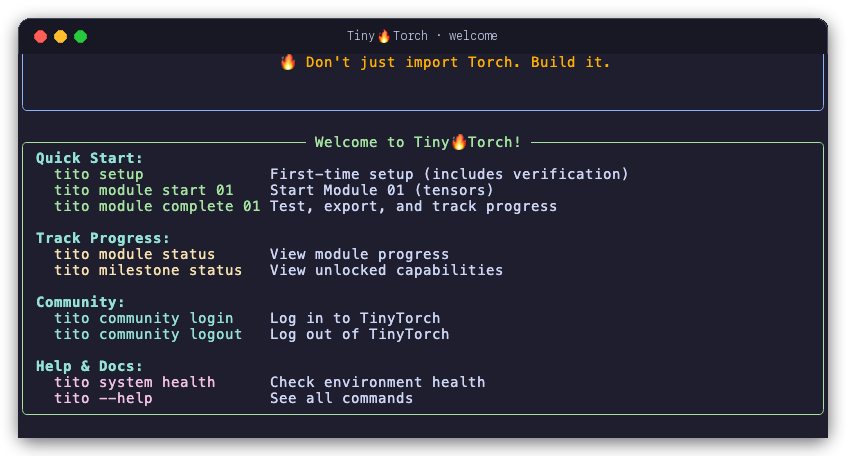
tito prints when you run it with no arguments.Everyone wants to be an astronaut. Very few want to be the rocket scientist.
Machine learning is no different. Everyone wants to train models, run inference, deploy AI. Few want to understand how the frameworks actually work. Fewer still want to build one.
The world has plenty of users. It does not have enough builders: people who can debug, optimize, and adapt systems when the black box breaks down.
TinyTorch is for the builders.
A Two-Minute Orientation
TinyTorch Overview
· AI-generated
The Problem
Most people can use PyTorch or TensorFlow. They can import libraries, call functions, train models. But very few understand how these frameworks work: how memory is managed for tensors, how autograd builds computation graphs, how optimizers update parameters. And almost no one has a guided, structured way to learn that from the ground up.
Why does this matter? Because users hit walls that builders do not:
- When your model runs out of memory, you need to understand tensor allocation
- When gradients explode, you need to understand the computation graph
- When training is slow, you need to understand where the bottlenecks are
- When deploying on a microcontroller, you need to know what can be stripped away
The framework becomes a black box you cannot debug, optimize, or adapt. You are stuck waiting for someone else to solve your problem.
Students cannot learn this from production code. PyTorch is too large, too complex, too optimized: millions of lines of C++, CUDA, and Python across thousands of files. No one learns to build rockets by studying the Saturn V.
They also cannot learn it from toy scripts. A hundred-line neural network does not reveal the architecture of a framework. It hides it.
The Solution: AI Bricks
TinyTorch teaches you the AI bricks: the stable engineering foundations you can use to build any AI system. Small enough to learn from: bite-sized code that runs even on a Raspberry Pi. Big enough to matter: showing the real architecture of how frameworks are built.
📖 MLSysBook
The Machine Learning Systems textbook teaches you the concepts of the rocket ship: propulsion, guidance, life support.
📘 TinyTorch: The Book
From Tensors to Transformers explains why each piece is built the way it is: the invariants, the memory traces, the napkin math, and the complete reference implementations, to read once yours works.
🛠️ TinyTorch: This Site
Where you actually build the rocket with your own hands: twenty modules and seven historical milestones, with tests and the tito CLI.
This is how you move from using machine learning to engineering it: from running code in a notebook to designing the systems that run underneath.
Who This Is For
Students & Researchers
Want to understand ML systems deeply, not just use them superficially. If you have wondered “how does that actually work?”, this is for you.
ML Engineers
Need to debug, optimize, and deploy models in production. Understanding the systems underneath makes you more effective.
Systems Programmers
You understand memory hierarchies, computational complexity, performance optimization. You want to apply it to ML.
Self-taught Engineers
Can use frameworks but want to know how they work. Preparing for ML infrastructure roles and need systems-level understanding.
What you need is not another API tutorial. You need to build.
What You Need to Start
You do not need to be a machine learning expert, and you do not need to have built a framework before. You need three things.
Python
If you can read and write a function, a loop, and a class, you have enough. There is no C++, no CUDA, no assembly. Everything sits on NumPy, and you will pick up the NumPy you need as you go.
The math you already have
Vectors, matrices, and the chain rule from first-year calculus. That is the whole list. No measure theory, no convex optimization, no proofs. When a derivative shows up, we derive it in code, not on a chalkboard.
A machine that turns on
TinyTorch runs on a laptop. It runs on a Raspberry Pi. The code is small on purpose, so you can hold a module in your head and run it on hardware you already own. No GPU, no cloud account, no four-figure compute bill.
If you have used PyTorch and felt like a tourist, this is the ground you were standing on.
The Journey: Foundation to Production
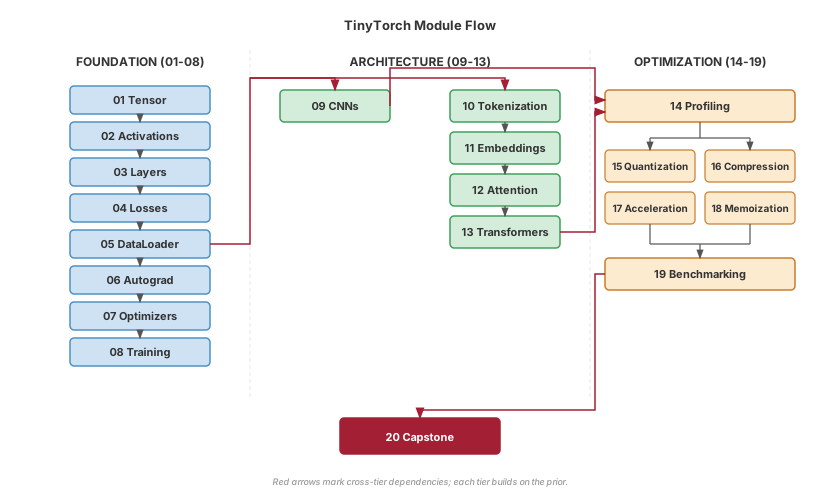
TinyTorch takes you from a bare tensor to a production-style ML system in twenty modules. They connect like this.
Three tiers, one system:
Foundation (01-08): Build the core machinery. Tensors hold data, activations add non-linearity, layers combine them, losses measure error, DataLoader streams batches, autograd computes gradients, optimizers update weights, training orchestrates the loop.
Architecture (09-13): Apply the foundation to real problems. The DataLoader from Module 05 feeds data; from there you take one of two paths: convolutions for images, or the transformer stack (Tokenization → Embeddings → Attention → Transformers) for text.
Optimization (14-19): Make it fast. Profile to find bottlenecks, then apply quantization, compression, acceleration, or memoization. Benchmark to prove the gain.
Figure 1 shows how the pieces fit together.
Flexible paths:
- Vision focus — Foundation (01–08) → Convolutions (09) → Optimization (14–19) (Modules 14 and 18 build on the transformer stack in 10–13)
- Language focus — Foundation (01–08) → Tokenization → Embeddings → Attention → Transformers (10–13) → Optimization (14–19)
- Full course — Both paths → Capstone (20)
What You Will Build
By the end of TinyTorch, you will have implemented:
- A tensor library with broadcasting, reshaping, and matrix operations
- Activation functions with numerical stability considerations
- Neural network layers: linear, convolutional, normalization
- An autograd engine that builds computation graphs and computes gradients
- Optimizers that update parameters using those gradients
- Data loaders that handle batching, shuffling, and preprocessing
- A complete training loop that ties everything together
- Tokenizers, embeddings, attention, and transformer architectures
- Profiling, quantization, and optimization techniques
Not a simulation. The actual architecture of modern ML frameworks, implemented at a scale you can hold in your head.
Milestones You’ll Unlock
As you build, you unlock historical milestones: moments when your code does something that once made headlines:
- 1958 Perceptron: Rosenblatt’s forward pass, running on your Linear layer with random weights
- 1969 XOR: Your single-layer perceptron fails XOR, exactly as Minsky and Papert proved it must
- 1986 MLP: Hidden layers and backprop solve XOR, then scale up to handwritten digits (Rumelhart)
- 1998 CNN: Your convolutional network classifies images with spatial understanding (LeCun’s LeNet-5)
- 2017 Transformer: Your attention mechanism solves structured sequence tasks (Vaswani et al.)
- 2018 MLPerf to Generative Serving: You measure your optimized system with MLPerf’s discipline, on classroom workloads
- 2024 Custom Kernels: Your tiled, fused, and im2col kernels hold up on ragged shapes, timed against C++ SIMD, Apple Metal MPS, and OpenAI Triton kernels
Each milestone activates when you complete the required modules. You are not just learning; you are recreating nearly seven decades of ML evolution, one working implementation at a time.
What You’ll Have at the End
Concrete outcomes at each major checkpoint:
Table 1 pins down the concrete outcome you unlock at each checkpoint.
| After Module | You’ll Have Built | Historical Context |
|---|---|---|
| 01-03 | Perceptron forward pass | Rosenblatt 1958 |
| 01-08 | MLP solving XOR + complete training pipeline | AI Winter breakthrough 1969→1986 |
| 01-09 | CNN with convolutions and pooling | LeNet-5 (1998) |
| 01-08 + 10-13 | GPT model with autoregressive generation | “Attention Is All You Need” (2017) |
| 01-08 + 11-19 | Optimized, quantized, accelerated system | Production ML today |
| 01-20 | MLPerf-style benchmarking submission | Torch Olympics |
| 01, 06, 09, 14, 17 | Custom kernels (tiling, im2col, fusion) timed against SIMD, Metal, and Triton | Modern Hardware Acceleration (2024) |
By Module 13 you’ll have assembled a GPT-style transformer from your own layers and run it end to end. By Module 20 you’ll measure your whole framework with MLPerf’s discipline. You implement each mechanism once, where it first appears, and the repeated variants arrive already written so the work stays on the concept rather than on retyping a pattern you have shown you understand. Every module page lists exactly what you write under What you write.
Choose Your Learning Path
Pick the route that matches your goals and the time you have. Every route starts at Module 01.
| Path | Modules | Time | Suits |
|---|---|---|---|
| Full course | All 20, in order | 90–130 hours | Students, and anyone who wants the whole framework, from tensors to benchmarking |
| Vision focus | 01–09, then 14–19 | 64–94 hours | Computer vision and ML ops; you finish with CNNs and measured optimizations. Modules 14 and 18 assume Modules 10–13 |
| Language focus | 01–08, then 10–13 | 53–77 hours | NLP and research engineering; you finish with a GPT-style transformer built from your own layers |
| Instructor sampler | Read 01, 03, 05, 07, 12 | A few hours | Judging whether the course fits a class you teach |
tito currently completes modules in numeric order, so on a focused path you still complete the modules in between; the path tells you where to spend your attention.
Two Optimization modules sit on the language side of the course even though they read as general performance work. Module 14 accounts for TinyGPT’s parameter budget, and Module 18 builds a KV cache for the attention you write in Modules 12 and 13. On the vision path, work through 10–13 before those two rather than skipping them.
How to Learn
Each module follows a Build-Use-Reflect cycle: implement from scratch, apply to real problems, then connect what you built to production systems and understand the tradeoffs. Work through Foundation first, then choose your path based on your interests.
Type the code the module asks you for
Do not copy-paste. The learning happens in the struggle of implementation.
Profile your code
Use built-in profiling tools. Measure first, optimize second.
Run the tests
Every module ships with tests. When they pass, you have built something real.
Then read why
Once your implementation works, the book chapter explains its design and compares it with PyTorch’s.
Take your time. The goal is not to finish fast. The goal is to understand deeply.
Expect to Struggle (That’s the Design)
TinyTorch treats productive struggle as a teaching tool. You will debug tensor shape mismatches, trace gradient flow through tangled graphs, and fight for memory inside tight constraints. The friction is intentional. It is your brain rewiring around how ML systems actually work.
What helps when you’re stuck:
- Run the tests early and often; they are your fastest feedback loop.
- The
if __name__ == "__main__"blocks show the expected workflow. - The ML Systems Thinking questions validate that you understood, not just that you typed.
- Each module page lists the real error messages that module prints, and what each one means.
When to ask for help:
- After you’ve run the tests and read the error message carefully.
- After you’ve tried explaining the problem out loud to a rubber duck.
- If you’ve been stuck on a single bug for more than thirty minutes.
The goal isn’t to never struggle. It’s to struggle productively, and to leave each module knowing why the working version works.
The Bigger Picture
TinyTorch is one piece of a larger curriculum, and every piece exists for the same reason: students who only read do not internalize, and students who only code do not generalize. The Machine Learning Systems textbook gives you the concepts: how training works, why accelerators matter, what makes inference cheap or expensive. This site and its twenty modules make you build the machinery yourself, and the companion book, TinyTorch: From Tensors to Transformers, explains why each piece is built the way it is, with complete reference implementations to read once yours works. The hardware kits put what you built on real devices, where memory limits, power budgets, and latency stop being abstractions. And StaffML tests whether you can reason about these systems under pressure, the way an interview or a production incident will.
This follows a long tradition in engineering education. You learned electronics by wiring a circuit on a breadboard. You learned architecture by laying out a processor on an FPGA. Operating systems courses have students build a small kernel of their own. You do not understand a system until you have built one. The same tradition runs through systems education: SICP’s “build to understand” philosophy, xv6’s transparent operating system, Nachos, Pintos. TinyTorch brings it to machine learning, and it grew out of years of teaching these ideas at Harvard and building the open MLSysBook curriculum. The pedagogical principles are detailed in our research paper, which positions this work within decades of CS education research.
The next generation of engineers cannot rely on magic. They need to see how everything fits together, from a single tensor allocation up to a full training loop, and feel that the systems running modern AI are not an unreachable tower but something they can open, shape, and rebuild.
That is what TinyTorch offers: the confidence that comes from having built it yourself.
On Architecture, Craft, and Progressive Disclosure
I learned computer systems by building them. In computer science, that is how we master complex abstractions: we learn operating systems by writing a kernel like xv6; we learn compilers by writing an AST parser and a code generator; we learn computer architecture by designing a pipelined processor.
Yet in machine learning, that tactile, build-it-from-scratch pedagogy was missing. Most people learn deep learning as passive consumers of massive frameworks: importing a library, calling .fit(), and treating the underlying machinery as an opaque black box. I wanted to bring the foundational systems way of learning to a field that desperately needed it.
My goal was to give students and learners a framework that clicks together like a precision Lego set. Granted, systems engineers do not usually invent the original mathematical algorithms (the backpropagation formulation, the attention mechanism, and adaptive optimizers were created by pioneering researchers). But there is tremendous intellectual merit, craft, and discipline in understanding how those pieces actually fit together into a performant, coherent engine. I wanted learners to hold every piece in their hands: to lay out raw tensor memory, attach the autograd tape, wire up the optimizer, assemble multi-headed attention, and watch a complete GPT transformer come to life from components they engineered themselves.
Designing that progression was one of the hardest parts of this project. Progressive disclosure in a complex software stack is deceptively difficult. Every single module had to be self-contained and immediately runnable on day one, yet snap cleanly into the next module without circular dependencies, hidden global state, or hand-waving. I spent countless days and nights brainstorming, sifting through design possibilities, and writing prototypes only to tear them down when the progression did not feel natural for learners. Every abstraction boundary in this framework was shaped through that iteration.
A Note on AI Assistance and Modern Engineering
To bring this curriculum together at the depth and rigor it required, I worked side by side with AI coding assistants. I want to be transparent about what that collaboration actually looked like:
- The architecture, pedagogical progression, and design decisions were mine. I decided how the pieces should fit together, what should be included in the core versus the extensions, and how to sequence the concepts so learners build real systems intuition.
- I used AI as an untiring pair programmer and sounding board. We used AI to help scaffold initial code blocks, generate repetitive boilerplate, write test harnesses, and translate concepts into C++ and Triton kernels.
- We brainstormed and stress-tested relentlessly. I used the AI to debate trade-offs, challenge over-engineered ideas, and refine explanations until they were direct and clear.
- Exhaustive verification. We used AI to verify mathematical equations against numerical baselines in PyTorch and NumPy, construct unit test suites, run regression checks, and inspect rendered figures and tables to ensure everything met high visual and technical standards.
This is what modern engineering looks like: the human provides the domain judgment, the architectural blueprint, and the pedagogical vision; the AI provides speed, exhaustiveness, and rapid iteration.
A thought for students and learners: As you work through TinyTorch, you will likely use AI tools like Cursor, Copilot, Claude, or Gemini. I encourage you to use them. But be deliberate about how you do.
If you use AI to simply generate solutions for the exercises, you skip the struggle, and the struggle is where the learning happens. You miss the visceral understanding of stride arithmetic, memory bandwidth bottlenecks, and cache locality.
Use AI the way we did: as a tireless collaborator. Ask it to explain why an unaligned vector load carries a performance penalty. Have it help you write tricky unit tests. Use it to review your code for edge cases. But make sure that you understand how every nut and bolt fits together; because in systems engineering, real mastery comes from knowing how the machine works from the ground up.
Vijay Janapa Reddi
For Instructors
Every engineering course has a lab, because students learn to build by building. TinyTorch is that lab for machine learning systems, and it is built to be taught. The modules come with tests and autograding so you can guide students as they build, and the instructor hub at mlsysbook.ai collects what you need to bring this into a classroom: the AI Engineering Blueprint, lecture slides, a course map, and assessment guides. These materials are still growing, and we welcome ideas and contributions from anyone teaching with them.
Start with For Instructors, which covers assignment tiers, nbgrader, and when to hand out the book.
Make It Better
TinyTorch is open source, and it is built the way it teaches: in the open, by people who wanted to understand it. Every module, test, and milestone lives in the open, so if you find a bug, an explanation that did not land, or a cleaner way to teach a concept, you can fix it, and the next reader gets the benefit. The students who learn the most from TinyTorch are often the ones who end up improving it.
Found a problem? Built something better? Think a design choice is wrong? Bring it to mlsysbook.ai/git.
Prof. Vijay Janapa Reddi
(Harvard University)
2025
Start Building
You have the map. Module 01 builds the tensor, the data structure every other module depends on. A few hours from now you’ll have a working Tensor class and a green test suite, and the path to CNNs, transformers, and an MLPerf-style benchmark will be one module shorter.
Next step. Follow the Quick Start Guide to set up your environment (about 5 minutes), complete Module 01: Tensor (4–6 hours), and watch your first tests pass.
The journey from tensors to transformers starts with a single import tinytorch.