Big Picture#

2-minute orientation before you begin building

This page answers: How do all the pieces fit together? Read this before diving into modules to build your mental map.


The Journey: Foundation to Production#

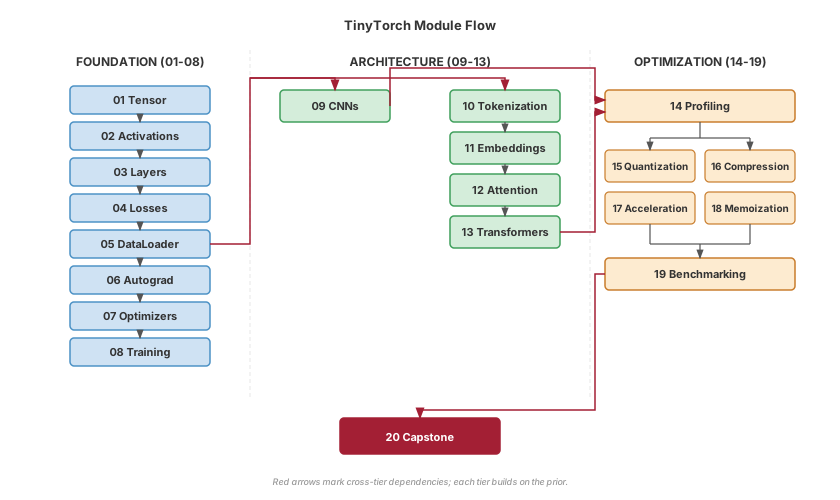
TinyTorch takes you from basic tensors to production-ready ML systems through 20 progressive modules. Here’s how they connect:

Three tiers, one complete system:

  • Foundation (blue): Build the core machinery—tensors hold data, activations add non-linearity, layers combine them, losses measure error, autograd computes gradients, optimizers update weights, and training orchestrates the loop. Each piece answers “what do I need to learn next?”

  • Architecture (purple): Apply your foundation to real problems. DataLoader feeds data efficiently, then you choose your path: Convolutions for images or Transformers for text (Tokenization → Embeddings → Attention → Transformers).

  • Optimization (orange): Make it fast. Profile to find bottlenecks, then apply quantization, compression, memoization, or acceleration. Benchmarking measures your improvements.

        graph LR
    subgraph F["FOUNDATION (01-07)"]
        direction TB
        T["Tensor"] --> A["Activations"]
        A --> L["Layers"]
        L --> Loss["Losses"]
        Loss --> Auto["Autograd"]
        Auto --> Opt["Optimizers"]
        Opt --> Train["Training"]
    end

    subgraph Arch["ARCHITECTURE (08-13)"]
        direction TB
        Data["DataLoader"]
        Data --> Conv["CNNs"]
        Data --> Tok["Tokentic"]
        Tok --> Emb["Embed"]
        Emb --> Att["Attention"]
        Att --> Trans["Transform"]
    end

    subgraph Optim["OPTIMIZATION (14-19)"]
        direction TB
        Prof["Profiling"]
        Prof --> Q["Quant"]
        Prof --> C["Compress"]
        Prof --> M["Memo"]
        Prof --> Ac["Accel"]
        Q & C & M & Ac --> Bench["Benchmark"]
    end

    Train --> Data
    Conv --> Prof
    Trans --> Prof
    Bench --> Cap["20: Capstone"]

    %% Foundation - Light Blue (dark text readable)
    style T fill:#bbdefb,stroke:#1976d2
    style A fill:#bbdefb,stroke:#1976d2
    style L fill:#bbdefb,stroke:#1976d2
    style Loss fill:#bbdefb,stroke:#1976d2
    style Auto fill:#bbdefb,stroke:#1976d2
    style Opt fill:#bbdefb,stroke:#1976d2
    style Train fill:#bbdefb,stroke:#1976d2

    %% Architecture - Light Purple (dark text readable)
    style Data fill:#e1bee7,stroke:#7b1fa2
    style Conv fill:#e1bee7,stroke:#7b1fa2
    style Tok fill:#e1bee7,stroke:#7b1fa2
    style Emb fill:#e1bee7,stroke:#7b1fa2
    style Att fill:#e1bee7,stroke:#7b1fa2
    style Trans fill:#e1bee7,stroke:#7b1fa2

    %% Optimization - Light Orange (dark text readable)
    style Prof fill:#ffe0b2,stroke:#f57c00
    style Q fill:#ffe0b2,stroke:#f57c00
    style C fill:#ffe0b2,stroke:#f57c00
    style M fill:#ffe0b2,stroke:#f57c00
    style Ac fill:#ffe0b2,stroke:#f57c00
    style Bench fill:#ffe0b2,stroke:#f57c00

    %% Capstone - Light Gold (dark text readable)
    style Cap fill:#fff9c4,stroke:#f9a825

    %% Subgraph backgrounds
    style F fill:#e3f2fd,stroke:#1976d2
    style Arch fill:#f3e5f5,stroke:#7b1fa2
    style Optim fill:#fff3e0,stroke:#f57c00
    

Fig. 1 TinyTorch Module Flow. The 20 modules progress through three tiers: Foundation (blue) builds core ML primitives, Architecture (purple) applies them to vision and language tasks, and Optimization (orange) makes systems production-ready.#

Flexible paths:

  • Vision focus: Foundation → DataLoader → Convolutions → Optimization

  • Language focus: Foundation → DataLoader → Tokenization → … → Transformers → Optimization

  • Full course: Both paths → Capstone

Key insight: Each tier unlocks a historical milestone. You’re not just learning—you’re recreating 70 years of ML evolution.


What You’ll Have at the End#

Concrete outcomes at each major checkpoint:

After Module

You’ll Have Built

Historical Context

01-04

Working Perceptron classifier

Rosenblatt 1957

01-06

MLP solving XOR (hidden layers!)

AI Winter breakthrough 1969→1986

01-08

Complete training pipeline with DataLoader

Backpropagation era

01-09

CNN with convolutions and pooling

LeNet-5 (1998)

01-13

GPT model with autoregressive generation

“Attention Is All You Need” (2017)

01-19

Optimized, quantized, accelerated system

Production ML today

01-20

MLPerf-style benchmarking submission

Torch Olympics

The North Star Build

By module 13, you’ll have a complete GPT model generating text—built from raw Python. By module 20, you’ll benchmark your entire framework with MLPerf-style submissions. Every tensor operation, every gradient calculation, every optimization trick: you wrote it.

Choose Your Learning Path#

Pick the route that matches your goals and available time:

Sequential Builder
Complete all 20 modules in order

Best for: Students, career transitioners, deep understanding
Time: 60-80 hours (8-12 weeks part-time)
Outcome: Complete mental model of ML systems

Vision Track
01-09 → 14-19 (CNNs + optimization)

Best for: Computer vision focus, MLOps practitioners
Time: 40-50 hours
Outcome: CNN architectures + production optimization

Language Track
01-08 → 10-13 (transformers + GPT)

Best for: NLP focus, research engineers
Time: 35-45 hours
Outcome: Complete GPT model with text generation

Instructor Sampler
Read: 01, 03, 05, 07, 12 (key concepts)

Best for: Evaluating for course adoption
Time: 8-12 hours (reading, not building)
Outcome: Assessment of pedagogical approach

Tip

All paths start with Module 01 (Tensor)—it’s the foundation everything else builds on. You can switch paths anytime based on what you find interesting.


Expect to Struggle (That’s the Design)#

Getting stuck is not a bug—it’s a feature.

TinyTorch uses productive struggle as a teaching tool. You’ll encounter moments where you need to:

  • Debug tensor shape mismatches

  • Trace gradient flow through complex graphs

  • Optimize memory in tight constraints

This is intentional. The frustration you feel is your brain rewiring to understand ML systems at a deeper level.

What helps:

  • Each module has comprehensive tests—use them early and often

  • The if __name__ == "__main__" blocks show expected workflows

  • Assessment questions (ML Systems Thinking sections) validate your understanding

  • Production context notes connect your implementations to PyTorch/TensorFlow

When to ask for help:

  • After you’ve run the tests and read error messages carefully

  • When you’ve tried explaining the problem to a rubber duck

  • If you’re stuck for more than 30 minutes on a single bug

The goal isn’t to never struggle—it’s to struggle productively and learn from it.

Ready to Start?#

Next step: Follow the Quick Start Guide to:

  1. Set up your environment (2 minutes)

  2. Complete Module 01: Tensor (2-3 hours)

  3. See your first tests pass

The journey from tensors to transformers starts with a single import tinytorch.

Remember

You don’t need to be an expert to start. You just need to be curious and willing to struggle through hard problems. The framework will guide you—one module at a time.

Questions before starting? Review the Learning Philosophy.