Progress & Data Management
Track Your Journey
Understanding progress tracking, data management, and reset commands
Purpose: Learn how TinyTorch tracks your progress, where your data lives, and how to manage it effectively.
Your Learning Journey: Two Tracking Systems
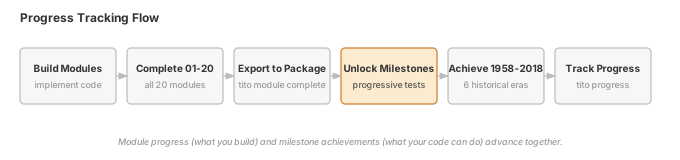
TinyTorch uses a clean, simple approach to track your ML systems engineering journey:
The Two Systems
Module Progress
What you BUILD (01-20)
- Tensor, Autograd, Optimizers
- Layers, Training, DataLoader
- Convolutions, Transformers
- Your complete ML framework
Milestone Achievements
What you ACHIEVE (01-06)
- Perceptron (1958)
- XOR Crisis (1969)
- MLP Revival (1986)
- CNN Revolution (1998)
- Transformer Era (2017)
- MLPerf (2018)
Simple relationship: - Complete modules → Unlock milestones → Achieve historical ML recreations - Build capabilities → Validate with history → Track achievements
Where Your Data Lives
All your progress is stored in the .tito/ folder:
TinyTorch/
├── .tito/ ← Your progress data
│ ├── config.json ← User preferences
│ ├── progress.json ← Module completion (01-20)
│ ├── milestones.json ← Milestone achievements (01-06)
│ └── backups/ ← Automatic safety backups
│ ├── 01_tensor_YYYYMMDD_HHMMSS.py
│ ├── 02_activations_YYYYMMDD_HHMMSS.py
│ └── ...
├── modules/ ← Where you edit
├── tinytorch/ ← Where code exports
└── ...
Understanding Each File
config.json - User Preferences
{
 "logo_theme": "standard"
}- UI preferences
- Display settings
- Personal configuration
progress.json - Module Completion
{
 "version": "1.0",
 "completed_modules": [1, 2, 3, 4, 5, 6, 7],
 "completion_dates": {
 "1": "2025-11-16T10:00:00",
 "2": "2025-11-16T11:00:00",
 ...
 }
}- Tracks which modules (01-20) you’ve completed
- Records when you completed each
- Updated by
tito module complete XX
milestones.json - Milestone Achievements
{
 "version": "1.0",
 "completed_milestones": ["03"],
 "completion_dates": {
 "03": "2025-11-16T15:00:00"
 }
}- Tracks which milestones (01-06) you’ve achieved
- Records when you achieved each
- Updated by
tito milestone run XX
backups/ - Module Backups - Automatic backups before operations - Timestamped copies of your implementations - Safety net for module development - Format: XX_name_YYYYMMDD_HHMMSS.py
Progress Views
Module Progress: tito module status
tito module statusShows your module completion progress:
╭─────────────── TinyTorch Progress ────────────────╮
│ │
│ Modules Completed: 7/20 (35%) │
│ Milestones Achieved: 1/6 (17%) │
│ Last Activity: Module 07 (2 hours ago) │
│ │
│ Next Steps: │
│ • Complete modules 08-09 to unlock Milestone 04 │
│ │
╰──────────────────────────────────────────────────────╯

Module Progress:
 01 Tensor
 02 Activations
 03 Layers
 04 Losses
 05 DataLoader
 06 Autograd
 07 Optimizers
 08 Training
 09 Convolutions
 10 Tokenization
 ...

Milestone Achievements:
 03 - MLP Revival (1986)
 04 - CNN Revolution (1998) [Ready after modules 08-09]
 05 - Transformer Era (2017)
 06 - MLPerf (2018)
Use this to: - Check module completion - See next recommended steps - Track your learning journey
Milestone Achievements: tito milestone status
tito milestone statusShows your milestone achievements: - Which historical recreations you’ve completed - Which milestones are unlocked - What prerequisites remain
Data Management Commands
Reset a Module
Need to start a module over? The reset command lets you reset a specific module cleanly.
Reset a Specific Module
tito module reset XXWhat this does: - Resets the specified module to its clean state - Creates a backup of your current implementation - Keeps other modules untouched - Asks for confirmation before proceeding
Example:
tito module reset 03Example output:
️ Warning: This will reset Module 03 (Layers)

This will:
 • Backup current implementation
 • Reset module to clean state
 • Clear module completion status

Your code will be backed up to .tito/backups/

Continue? [y/N]: y

 Creating backup at .tito/backups/03_layers_20251116_143000.py
 Resetting module to clean state

 Reset Complete!

You're ready to start fresh on Module 03.
Run: tito module start 03
Automatic Backups
Before any reset, TinyTorch automatically: - Creates timestamped backup of your implementation - Stores it in .tito/backups/ - Format: XX_name_YYYYMMDD_HHMMSS.py - Allows manual restore if needed
Data Safety & Recovery
Automatic Backups
TinyTorch automatically backs up your work:
When backups happen: 1. Before module start: Backs up existing work 2. Before reset: Creates full .tito/ backup 3. Before module reset: Saves current implementation
Where backups go:
.tito/backups/
├── 01_tensor_20251116_100000.py
├── 01_tensor_20251116_143000.py
├── 03_layers_20251115_180000.py
└── ...
How to use backups:
# Backups are timestamped - find the one you need
ls -la .tito/backups/

# Manually restore if needed
cp .tito/backups/03_layers_20251115_180000.py modules/03_layers/layers_dev.py
What If .tito/ Is Deleted?
No problem! TinyTorch recovers gracefully:
# If .tito/ is deleted, next command recreates it
tito system health
What happens: 1. TinyTorch detects missing .tito/ folder 2. Creates fresh folder structure 3. Initializes empty progress tracking 4. Your code in modules/ and tinytorch/ is safe 5. You can continue from where you left off
Important: Your actual code (source in src/, notebooks in modules/, package in tinytorch/) is separate from progress tracking (in .tito/). Deleting .tito/ only resets progress tracking, not your implementations.
Data Health Checks
Verify Data Integrity
tito system healthNow includes data health checks:
╭────────── TinyTorch System Check ──────────╮
│ │
│ Environment setup │
│ Dependencies installed │
│ TinyTorch in development mode │
│ Data files intact │
│ .tito/progress.json valid │
│ .tito/milestones.json valid │
│ .tito/config.json valid │
│ Backups directory exists │
│ │
╰───────────────────────────────────────────────╯

All systems ready!
If data is corrupted:
 Data files corrupted
 .tito/progress.json is malformed

Fix by removing and recreating:
 rm .tito/progress.json
 tito system health # Recreates the file

Or restore from backup:
 cp .tito_backup_YYYYMMDD/.tito/progress.json .tito/
Best Practices
Regular Progress Checks
Good habits:
- Check status regularly:
tito module status
tito milestone status
See where you are, what’s next
- Verify environment before work:
tito system healthCatch issues early
- Let automatic backups work:
- Don’t disable them
- They’re your safety net
- Cleanup happens automatically
- Reset modules when needed:
tito module reset XX # Reset a specific module- Version control for code:
git commit -m "Completed Module 05: DataLoader".tito/ is gitignored - use git for code versions
Understanding What Gets Tracked
Modules (Build Progress)
Tracked when: You run tito module complete XX
What’s recorded: - Module number (1-20) - Completion timestamp - Test results (passed/failed)
Visible in: - tito module status - .tito/progress.json
Milestones (Achievement Progress)
Tracked when: You run tito milestone run XX
What’s recorded: - Milestone ID (01-06) - Achievement timestamp - Number of attempts (if multiple runs)
Visible in: - tito milestone status - .tito/milestones.json
What’s NOT Tracked
TinyTorch does NOT track: - Your actual code implementations (source in src/, notebooks in modules/, package in tinytorch/) - How long you spent on each module - How many times you edited files - Your test scores or grades - Personal information - Usage analytics
Why: TinyTorch is a local, offline learning tool. Your privacy is protected. All data stays on your machine.
Common Data Scenarios
Scenario 1: “I want to reset a specific module”
# Reset module 03 to start fresh
tito module reset 03

# Start working on it again
tito module start 03Result: Module 03 reset to clean state, backup created, other modules untouched
Scenario 2: “I want to re-run a milestone”
# Just run the milestone again
tito milestone run 03Result: Milestone re-runs using your current implementations
Scenario 3: “I accidentally deleted .tito/”
# Just run any tito command
tito system health

# OR

# If you have a backup
cp -r .tito_backup_YYYYMMDD/ .tito/Result: .tito/ folder recreated, either fresh or from backup
FAQ
Q: Will resetting delete my code?
A: No! Reset commands only affect progress tracking in .tito/. Your source code in src/, notebooks in modules/, and exported code in tinytorch/ are never touched.
Q: Can I manually edit progress.json?
A: Yes, but not recommended. Use tito commands instead. Manual edits might break validation.
Q: What if I want to re-export a module?
A: Just run tito module complete XX again. It will re-run tests and re-export. Progress tracking remains unchanged.
Q: How do I see my completion dates?
A: Run tito module status for a formatted view, or check .tito/progress.json and .tito/milestones.json directly.
Q: Can I delete backups?
A: Yes, backups in .tito/backups/ can be deleted manually. They’re safety nets, not requirements.
Next Steps
Keep Building!
Now that you understand data management, focus on what matters: building ML systems
Your progress is tracked, your data is safe, and your journey is yours. TinyTorch keeps track of what you’ve built and achieved - you focus on learning ML systems engineering.