Module 03: Layers

NoteModule Info

FOUNDATION TIER | Difficulty: ●●○○ | Time: 5-7 hours | Prerequisites: 01, 02

Prerequisites: Modules 01 and 02 means you have built: - Tensor class with arithmetic, broadcasting, matrix multiplication, and shape manipulation - Activation functions (ReLU, Sigmoid, Tanh, Softmax) for introducing non-linearity - Understanding of element-wise operations and reductions

If you can multiply tensors, apply activations, and understand shape transformations, you’re ready.

🎧 Audio Overview

Listen to an AI-generated overview.

🚀 Launch Binder

Run interactively in your browser.

Open in Binder →

📄 View Source

Browse the source code on GitHub.

View on GitHub →
🔥 Slide Deck · AI-generated
1 / -
Loading slides...

Overview

Neural network layers are the fundamental building blocks that transform data as it flows through a network. Each layer performs a specific computation: Linear layers apply learned transformations (y = xW + b), while Dropout layers randomly zero elements for regularization. In this module, you’ll build these essential components from scratch, gaining deep insight into how PyTorch’s nn.Linear and nn.Dropout work under the hood.

Every neural network, from recognizing handwritten digits to translating languages, is built by stacking layers. The Linear layer learns which combinations of input features matter for the task at hand. Dropout prevents overfitting by forcing the network to not rely on any single neuron. Together, these layers enable multi-layer architectures that can learn complex patterns.

By the end, your layers will support parameter management, proper initialization, and seamless integration with the tensor and activation functions you built in previous modules.

Learning Objectives

TipBy completing this module, you will:
  • Implement Linear layers with proper weight initialization and parameter management for gradient-based training
  • Master the mathematical operation y = xW + b and understand how parameter counts scale with layer dimensions
  • Understand memory usage patterns (parameter memory vs activation memory) and computational complexity of matrix operations
  • Connect your implementation to production PyTorch patterns, including nn.Linear, nn.Dropout, and parameter tracking

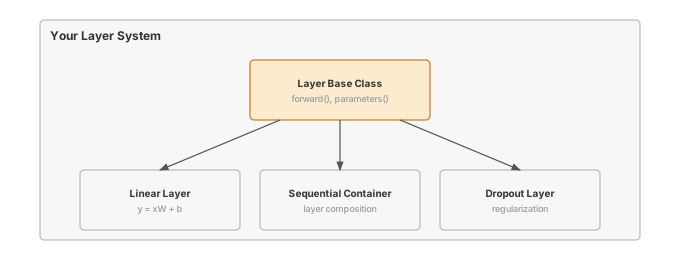
What You’ll Build

flowchart LR
    subgraph "Your Layer System"
        A["Layer Base Class<br/>forward(), parameters()"]
        B["Linear Layer<br/>y = xW + b"]
        C["Dropout Layer<br/>regularization"]
        D["Sequential Container<br/>layer composition"]
    end

    A --> B
    A --> C
    D --> B
    D --> C

    style A fill:#e1f5ff
    style B fill:#fff3cd
    style C fill:#f8d7da
    style D fill:#d4edda

Implementation roadmap:

Part What You’ll Implement Key Concept
1 Layer base class with forward(), __call__(), parameters() Consistent interface for all layers
2 Linear layer with proper initialization Learned transformation y = xW + b
3 Dropout with training/inference modes Regularization through random masking
4 Sequential container for layer composition Chaining layers together

The pattern you’ll enable:

# Building a multi-layer network
layer1 = Linear(784, 256)
activation = ReLU()
dropout = Dropout(0.5)
layer2 = Linear(256, 10)

# Manual composition for explicit data flow
x = layer1(x)
x = activation(x)
x = dropout(x, training=True)
output = layer2(x)

What You’re NOT Building (Yet)

To keep this module focused, you will not implement:

  • Automatic gradient computation (autograd is a later module)
  • Parameter optimization (optimizers are a later module)
  • Hundreds of layer types (PyTorch has Conv2d, LSTM, Attention - you’ll build Linear and Dropout)
  • Automatic training/eval mode switching (PyTorch’s model.train() - you’ll manually pass training flag)

You are building the core building blocks. Training loops and optimizers come later.

API Reference

This section provides a quick reference for the Layer classes you’ll build. Think of it as your cheat sheet while implementing and debugging. Each class is documented with its signature and expected behavior.

Layer Base Class

Layer()

Base class providing consistent interface for all neural network layers. All layers inherit from this and implement forward() and parameters().

Method Signature Description
forward forward(x) -> Tensor Compute layer output (must override)
__call__ __call__(x) -> Tensor Makes layer callable like a function
parameters parameters() -> List[Tensor] Returns list of trainable parameters

Linear Layer

Linear(in_features, out_features, bias=True)

Linear (fully connected) layer implementing y = xW + b.

Parameters: - in_features: Number of input features - out_features: Number of output features - bias: Whether to include bias term (default: True)

Attributes: - weight: Tensor of shape (in_features, out_features) (gradient tracking enabled later by autograd) - bias: Tensor of shape (out_features,) or None (gradient tracking enabled later by autograd)

Method Signature Description
forward forward(x) -> Tensor Applies linear transformation y = xW + b
parameters parameters() -> List[Tensor] Returns [weight, bias] or [weight]

Dropout Layer

Dropout(p=0.5)

Dropout layer for regularization. During training, randomly zeros elements with probability p and scales survivors by 1/(1-p). During inference, passes input unchanged.

Parameters: - p: Probability of zeroing each element (0.0 = no dropout, 1.0 = zero everything)

Method Signature Description
forward forward(x, training=True) -> Tensor Applies dropout during training, passthrough during inference
parameters parameters() -> List[Tensor] Returns empty list (no trainable parameters)

Sequential Container

Sequential(*layers)

Container that chains layers together sequentially. Provides convenient way to compose multiple layers.

Method Signature Description
forward forward(x) -> Tensor Forward pass through all layers in order
parameters parameters() -> List[Tensor] Collects all parameters from all layers

Core Concepts

This section covers the fundamental ideas you need to understand neural network layers deeply. These concepts apply to every ML framework, not just TinyTorch, so mastering them here will serve you throughout your career.

The Linear Transformation

Linear layers implement the mathematical operation y = xW + b, where x is your input, W is a weight matrix you learn, b is a bias vector you learn, and y is your output. This simple formula is the foundation of neural networks.

Think of the weight matrix as a feature detector. Each column of W learns to recognize a particular pattern in the input. When you multiply input x by W, you’re asking: “How much of each learned pattern appears in this input?” The bias b shifts the output, providing a baseline independent of the input.

Consider recognizing handwritten digits. A flattened 28×28 image has 784 pixels. A Linear layer transforming 784 features to 10 classes creates a weight matrix of shape (784, 10). Each of the 10 columns learns which combination of those 784 pixels indicates a particular digit. The network discovers these patterns through training.

Here’s how your implementation performs this transformation:

def forward(self, x):
    """Forward pass through linear layer."""
    # Linear transformation: y = xW
    output = x.matmul(self.weight)

    # Add bias if present
    if self.bias is not None:
        output = output + self.bias

    return output

The elegance is in the simplicity. Matrix multiplication handles all the feature combinations in one operation, and broadcasting handles adding the bias vector to every sample in the batch. This single method enables every linear transformation in neural networks.

Weight Initialization

How you initialize weights determines whether your network can learn at all. Initialize too small and gradients vanish, making learning impossibly slow. Initialize too large and gradients explode, making training unstable. The sweet spot ensures stable gradient flow through the network.

We use LeCun-style initialization, which scales weights by sqrt(1/in_features). This keeps the variance of activations roughly constant as data flows through layers, preventing vanishing or exploding gradients. (True Xavier/Glorot uses sqrt(2/(fan_in+fan_out)) which also considers output dimensions, but the simpler LeCun formula works well in practice.)

Here’s your initialization code:

def __init__(self, in_features, out_features, bias=True):
    """Initialize linear layer with proper weight initialization."""
    self.in_features = in_features
    self.out_features = out_features

    # LeCun-style initialization for stable gradients
    scale = np.sqrt(INIT_SCALE_FACTOR / in_features)
    weight_data = np.random.randn(in_features, out_features) * scale
    self.weight = Tensor(weight_data)

    # Initialize bias to zeros or None
    if bias:
        bias_data = np.zeros(out_features)
        self.bias = Tensor(bias_data)
    else:
        self.bias = None

Weights and biases are created as plain Tensors. When autograd is enabled later, it monkey-patches the Tensor class to support requires_grad, at which point you can set layer.weight.requires_grad = True for parameters that need gradients. Bias starts at zero because the weight initialization already handles the scale, and zero is a neutral starting point for per-class adjustments.

For Linear(1000, 10), the scale is sqrt(1/1000) ≈ 0.032. For Linear(10, 1000), the scale is sqrt(1/10) ≈ 0.316. Layers with more inputs get smaller initial weights because each input contributes to the output, and you want their combined effect to remain stable.

Parameter Management

Parameters are tensors that need gradients and optimizer updates. Your Linear layer manages two parameters: weights and biases. The parameters() method collects them into a list that optimizers can iterate over.

def parameters(self):
    """Return list of trainable parameters."""
    params = [self.weight]
    if self.bias is not None:
        params.append(self.bias)
    return params

This simple method enables powerful workflows. When you build a multi-layer network, you can collect all parameters from all layers and pass them to an optimizer:

layer1 = Linear(784, 256)
layer2 = Linear(256, 10)

all_params = layer1.parameters() + layer2.parameters()
# Pass all_params to optimizer.step() during training

Each Linear layer independently manages its own parameters. The Sequential container extends this pattern by collecting parameters from all its contained layers, enabling hierarchical composition.

Forward Pass Mechanics

The forward pass transforms input data through the layer’s computation. Every layer implements forward(), and the base class provides __call__() to make layers callable like functions. This matches PyTorch’s design exactly.

def __call__(self, x, *args, **kwargs):
    """Allow layer to be called like a function."""
    return self.forward(x, *args, **kwargs)

This lets you write output = layer(input) instead of output = layer.forward(input). The difference seems minor, but it’s a powerful abstraction. The __call__ method can add hooks, logging, or mode switching (like training vs eval), while forward() focuses purely on the computation.

For Dropout, the forward pass depends on whether you’re training or performing inference:

def forward(self, x, training=True):
    """Forward pass through dropout layer."""
    if not training or self.p == DROPOUT_MIN_PROB:
        # During inference or no dropout, pass through unchanged
        return x

    if self.p == DROPOUT_MAX_PROB:
        # Drop everything (preserve requires_grad for gradient flow)
        return Tensor(np.zeros_like(x.data), requires_grad=x.requires_grad)

    # During training, apply dropout
    keep_prob = 1.0 - self.p

    # Create random mask: True where we keep elements
    mask = np.random.random(x.data.shape) < keep_prob

    # Apply mask and scale using Tensor operations to preserve gradients
    mask_tensor = Tensor(mask.astype(np.float32), requires_grad=False)
    scale = Tensor(np.array(1.0 / keep_prob), requires_grad=False)

    # Use Tensor operations: x * mask * scale
    output = x * mask_tensor * scale
    return output

The key insight is the scaling factor 1/(1-p). If you drop 50% of neurons, the survivors need to be scaled by 2.0 to maintain the same expected value. This ensures that during inference (when no dropout is applied), the output magnitudes match training expectations.

Layer Composition

Neural networks are built by chaining layers together. Data flows through each layer in sequence, with each transformation building on the previous one. Your Sequential container captures this pattern:

class Sequential:
    """Container that chains layers together sequentially."""

    def __init__(self, *layers):
        """Initialize with layers to chain together."""
        if len(layers) == 1 and isinstance(layers[0], (list, tuple)):
            self.layers = list(layers[0])
        else:
            self.layers = list(layers)

    def forward(self, x):
        """Forward pass through all layers sequentially."""
        for layer in self.layers:
            x = layer.forward(x)
        return x

    def parameters(self):
        """Collect all parameters from all layers."""
        params = []
        for layer in self.layers:
            params.extend(layer.parameters())
        return params

This simple container demonstrates a powerful principle: composition. Complex architectures emerge from simple building blocks. A 3-layer network is just three Linear layers with activations and dropout in between:

model = Sequential(
    Linear(784, 256), ReLU(), Dropout(0.5),
    Linear(256, 128), ReLU(), Dropout(0.3),
    Linear(128, 10)
)

The forward pass chains computations, and parameters() collects all trainable tensors. This composability is a hallmark of good system design.

Memory and Computational Complexity

Understanding the memory and computational costs of layers is essential for building efficient networks. Linear layers dominate both parameter memory and computation time in fully connected architectures.

Parameter memory for a Linear layer is straightforward: in_features × out_features × 4 bytes for weights, plus out_features × 4 bytes for bias (assuming float32). For Linear(784, 256):

Weights: 784 × 256 × 4 = {python} mem_weight_bytes bytes ≈ {python} mem_weight_kb KB Bias: 256 × 4 = {python} mem_bias_bytes bytes ≈ {python} mem_bias_kb KB Total: ≈ {python} mem_total_kb KB

Activation memory depends on batch size. For batch size 32 and the same layer:

Input: 32 × 784 × 4 = {python} mem_input_bytes bytes ≈ {python} mem_input_kb KB Output: 32 × 256 × 4 = {python} mem_output_bytes bytes ≈ {python} mem_output_kb KB

The computational cost of the forward pass is dominated by matrix multiplication. For input shape (batch, in_features) and weight shape (in_features, out_features), the operation requires batch × in_features × out_features multiplications and the same number of additions. Bias addition is just batch × out_features additions, negligible compared to matrix multiplication.

Operation Complexity Memory
Linear forward O(batch × in × out) O(batch × (in + out)) activations
Dropout forward O(batch × features) O(batch × features) mask
Parameter storage O(in × out) O(in × out) weights

For a 3-layer network (784→256→128→10) with batch size 32:

Layer 1: 32 × 784 × 256 = {python} flops_l1 FLOPs Layer 2: 32 × 256 × 128 = {python} flops_l2 FLOPs Layer 3: 32 × 128 × 10 = {python} flops_l3 FLOPs Total: ≈ {python} flops_total million FLOPs per forward pass

The first layer dominates because it has the largest input dimension. This is why production networks often use dimension reduction early to save computation in later layers.

Common Errors

These are the errors you’ll encounter most often when working with layers. Understanding why they happen will save you hours of debugging, both in this module and throughout your ML career.

Shape Mismatch in Layer Composition

Error: ValueError: Cannot perform matrix multiplication: (32, 128) @ (256, 10). Inner dimensions must match: 128 ≠ 256

This happens when you chain layers with incompatible dimensions. If layer1 outputs 128 features but layer2 expects 256 input features, the matrix multiplication in layer2 fails.

Fix: Ensure output features of one layer match input features of the next:

layer1 = Linear(784, 128)  # Outputs 128 features
layer2 = Linear(128, 10)   # Expects 128 input features ✓

Dropout in Inference Mode

Error: Test accuracy is much lower than training accuracy, but loss curves suggest good learning

Cause: You’re applying dropout during inference. Dropout should only zero elements during training. During inference, all neurons must be active.

Fix: Always pass training=False during evaluation:

# Training
output = dropout(x, training=True)

# Evaluation
output = dropout(x, training=False)

Missing Parameters

Error: Optimizer has no parameters to update, or parameter count is wrong

Cause: Your parameters() method doesn’t return all trainable tensors, or you forgot to set requires_grad=True.

Fix: Verify all tensors with requires_grad=True are returned:

def parameters(self):
    params = [self.weight]
    if self.bias is not None:
        params.append(self.bias)
    return params  # Must include all trainable tensors

Initialization Scale

Error: Loss becomes NaN within a few iterations, or gradients vanish immediately

Cause: Weights initialized too large (exploding gradients) or too small (vanishing gradients).

Fix: Use proper initialization scaling:

scale = np.sqrt(1.0 / in_features)  # LeCun-style, not just random()!
weight_data = np.random.randn(in_features, out_features) * scale

Production Context

Your Implementation vs. PyTorch

Your TinyTorch layers and PyTorch’s nn.Linear and nn.Dropout share the same conceptual design. The differences are in implementation details: PyTorch uses C++ for speed, supports GPU acceleration, and provides hundreds of specialized layer types. But the core abstractions are identical.

Feature Your Implementation PyTorch
Backend NumPy (Python) C++/CUDA
Initialization LeCun-style manual Multiple schemes (init.xavier_uniform_, init.kaiming_normal_)
Parameter Management Manual parameters() list nn.Module base class with auto-registration
Training Mode Manual training flag model.train() / model.eval() state
Layer Types Linear, Dropout 100+ layer types (Conv, LSTM, Attention, etc.)
GPU Support ✗ CPU only ✓ CUDA, Metal, ROCm

Code Comparison

The following comparison shows equivalent layer operations in TinyTorch and PyTorch. Notice how closely the APIs mirror each other.

from tinytorch.core.layers import Linear, Dropout, Sequential
from tinytorch.core.activations import ReLU

# Build layers
layer1 = Linear(784, 256)
activation = ReLU()
dropout = Dropout(0.5)
layer2 = Linear(256, 10)

# Manual composition
x = layer1(x)
x = activation(x)
x = dropout(x, training=True)
output = layer2(x)

# Or use Sequential
model = Sequential(
    Linear(784, 256), ReLU(), Dropout(0.5),
    Linear(256, 10)
)
output = model(x)

# Collect parameters
params = model.parameters()
import torch
import torch.nn as nn

# Build layers
layer1 = nn.Linear(784, 256)
activation = nn.ReLU()
dropout = nn.Dropout(0.5)
layer2 = nn.Linear(256, 10)

# Manual composition
x = layer1(x)
x = activation(x)
x = dropout(x)  # Automatically uses model.training state
output = layer2(x)

# Or use Sequential
model = nn.Sequential(
    nn.Linear(784, 256), nn.ReLU(), nn.Dropout(0.5),
    nn.Linear(256, 10)
)
output = model(x)

# Collect parameters
params = list(model.parameters())

Let’s walk through each difference:

  • Line 1-2 (Import): Both frameworks provide layers in a dedicated module. TinyTorch uses tinytorch.core.layers; PyTorch uses torch.nn.
  • Line 4-7 (Layer Creation): Identical API. Both use Linear(in_features, out_features) and Dropout(p).
  • Line 9-13 (Manual Composition): TinyTorch requires explicit training=True flag for Dropout; PyTorch uses global model state (model.train()).
  • Line 15-19 (Sequential): Identical pattern for composing layers into a container.
  • Line 22 (Parameters): Both use .parameters() method to collect all trainable tensors. PyTorch returns a generator; TinyTorch returns a list.
TipWhat’s Identical

Layer initialization API, forward pass mechanics, and parameter collection patterns. When you debug PyTorch shape errors or parameter counts, you’ll understand exactly what’s happening because you built the same abstractions.

Why Layers Matter at Scale

To appreciate why layer design matters, consider the scale of modern ML systems:

  • GPT-3: 175 billion parameters across 96 Linear layers (each layer transforming 12,288 features) = 350 GB of parameter memory
  • ResNet-50: 25.5 million parameters with 50 convolutional and linear layers = 100 MB of parameter memory
  • BERT-Base: 110 million parameters with 12 transformer blocks (each containing multiple Linear layers) = 440 MB of parameter memory

Every Linear layer in these architectures follows the same y = xW + b pattern you implemented. Understanding parameter counts, memory scaling, and initialization strategies isn’t just academic; it’s essential for building and debugging real ML systems. When GPT-3 fails to converge, engineers debug the same weight initialization and layer composition issues you encountered in this module.

Check Your Understanding

Test yourself with these systems thinking questions. They’re designed to build intuition for the performance characteristics you’ll encounter in production ML.

Q1: Parameter Scaling

A Linear layer has in_features=784 and out_features=256. How many parameters does it have? If you double out_features to 512, how many parameters now?

Original: 784 × 256 + 256 = {python} q1_orig_params parameters

Doubled: 784 × 512 + 512 = {python} q1_doubled_params parameters

Doubling out_features approximately doubles the parameter count because weights dominate ({python} q1_orig_weights vs {python} q1_doubled_weights for weights alone). This shows parameter count scales linearly with layer width.

Memory: {python} q1_orig_params × 4 = {python} q1_orig_bytes bytes ≈ {python} q1_orig_kb KB (original) vs {python} q1_doubled_params × 4 = {python} q1_doubled_bytes bytes ≈ {python} q1_doubled_mb MB (doubled)

Q2: Multi-layer Memory

A 3-layer network has architecture 784→256→128→10. Calculate total parameter count and memory usage (assume float32).

Layer 1: 784 × 256 + 256 = {python} q2_l1 parameters Layer 2: 256 × 128 + 128 = {python} q2_l2 parameters Layer 3: 128 × 10 + 10 = {python} q2_l3 parameters

Total: {python} q2_total parameters

Memory: {python} q2_total × 4 = {python} q2_mem_bytes bytes ≈ {python} q2_mem_kb KB

This is parameter memory only. Add activation memory for batch processing: for batch size 32, you need space for intermediate tensors at each layer (32×784, 32×256, 32×128, 32×10 = approximately {python} q2_act_kb KB more).

Q3: Dropout Scaling

Why do we scale surviving values by 1/(1-p) during training? What happens if we don’t scale?

With scaling: Expected value of output matches input. If p=0.5, half the neurons survive and are scaled by 2.0, so E[output] = 0.5 × 0 + 0.5 × 2x = x.

Without scaling: Expected value is halved. E[output] = 0.5 × 0 + 0.5 × x = 0.5x. During inference (no dropout), output would be x, creating a mismatch.

Result: Network sees different magnitude activations during training vs inference, leading to poor test performance. Scaling ensures consistent magnitudes.

Q4: Computational Bottleneck

For Linear layer forward pass y = xW + b, which operation dominates: matrix multiply or bias addition?

Matrix multiply: O(batch × in_features × out_features) operations Bias addition: O(batch × out_features) operations

For Linear(784, 256) with batch size 32: - Matmul: 32 × 784 × 256 = {python} q4_matmul operations - Bias: 32 × 256 = {python} q4_bias operations

Matrix multiply dominates by ~{python} q4_ratiox. This is why optimizing matmul (using BLAS, GPU kernels) is critical for neural network performance.

Q5: Initialization Impact

What happens if you initialize all weights to zero? To the same non-zero value?

All zeros: Network can’t learn. All neurons compute identical outputs, receive identical gradients, and update identically. Symmetry is never broken. Training is stuck.

Same non-zero value (e.g., all 1s): Same problem - symmetry. All neurons remain identical throughout training. You need randomness to break symmetry.

Proper initialization: Random values scaled by sqrt(1/in_features) break symmetry AND maintain stable gradient variance. This is why proper initialization is essential for learning.

Q6: Batch Size vs Throughput

From your timing analysis, batch size 32 processes 10,000 samples/sec, while batch size 1 processes 800 samples/sec. Why is batching faster?

Overhead amortization: Setting up matrix operations has fixed cost per call. With batch=1, you pay this cost for every sample. With batch=32, you pay once for 32 samples.

Vectorization: Modern CPUs/GPUs process vectors efficiently. Matrix operations on larger matrices utilize SIMD instructions and better cache locality.

Throughput calculation: - Batch=1: 800 samples/sec means each forward pass takes ~1.25ms - Batch=32: 10,000 samples/sec means each forward pass takes ~3.2ms for 32 samples = 0.1ms per sample

Batching achieves 12.5x better per-sample performance by better utilizing hardware.

Trade-off: Larger batches increase latency (time to process one sample) but dramatically improve throughput (samples processed per second).

Further Reading

For students who want to understand the academic foundations and mathematical underpinnings of neural network layers:

Seminal Papers

  • Understanding the difficulty of training deep feedforward neural networks - Glorot and Bengio (2010). Introduces Xavier/Glorot initialization and analyzes why proper weight scaling matters for gradient flow. The foundation for modern initialization schemes. PMLR

  • Delving Deep into Rectifiers: Surpassing Human-Level Performance on ImageNet Classification - He et al. (2015). Introduces He initialization tailored for ReLU activations. Shows how initialization schemes must match activation functions for optimal training. arXiv:1502.01852

  • Dropout: A Simple Way to Prevent Neural Networks from Overfitting - Srivastava et al. (2014). The original dropout paper demonstrating how random neuron dropping prevents overfitting. Includes theoretical analysis and extensive empirical validation. JMLR

Additional Resources

  • Textbook: “Deep Learning” by Goodfellow, Bengio, and Courville - Chapter 6 covers feedforward networks and linear layers in detail
  • Documentation: PyTorch nn.Linear - See how production frameworks implement the same concepts
  • Blog Post: “A Recipe for Training Neural Networks” by Andrej Karpathy - Practical advice on initialization, architecture design, and debugging

What’s Next

NoteComing Up: Module 04 - Losses

Implement loss functions (MSELoss, CrossEntropyLoss) that measure prediction error. You’ll combine your layers with loss computation to evaluate how wrong your model is - the foundation for learning.

Preview - How Your Layers Get Used in Future Modules:

Module What It Does Your Layers In Action
04: Losses Measure prediction error loss = CrossEntropyLoss()(model(x), y)
06: Autograd Compute gradients loss.backward() fills layer.weight.grad
07: Optimizers Update parameters optimizer.step() uses layer.parameters()

Get Started

TipInteractive Options
WarningSave Your Progress

Binder sessions are temporary. Download your completed notebook when done, or clone the repository for persistent local work.

Back to top