Module 05: DataLoader

Training is I/O-bound before it is compute-bound. DataLoader is where the system learns to overlap disk reads, preprocessing, and accelerator compute so the GPU never sits idle. Your batch, shuffle, and collate logic decides whether an 8-GPU box runs at 8x or at 0.8x a single-GPU baseline.

NoteModule Info

FOUNDATION TIER | Difficulty: ●●○○ | Time: 3-5 hours | Prerequisites: 01-04

Prerequisites: You should be comfortable with tensors, activations, layers, and losses from Modules 01-04. This module introduces data loading infrastructure that will be used by autograd, optimizers, and training loops in the following modules.

🎧 Audio Overview

Listen to an AI-generated overview.

🚀 Launch Binder

Run interactively in your browser.

Open in Binder →

📄 View Source

Browse the source code on GitHub.

View on GitHub →
🔥 Slide Deck · AI-generated
1 / -
Loading slides...

Overview

A naive training loop reaches into a 50,000-image dataset, picks one sample, computes a gradient, and repeats. It works. It also wastes the GPU and gets the math wrong: gradients computed on a sorted sequence of samples are not the gradients you intended. Every framework solves this with the same abstraction — a DataLoader sitting between storage and computation, turning raw samples into shuffled, contiguous batches.

In this module you build that abstraction. A Dataset says how to find sample i. A DataLoader decides how many samples to group, in what order, and when to load them. The result is a single iterator that works identically on 1,000 tensors in RAM or 100 GB of JPEGs on disk — and that you will reuse, unchanged, in every later module that trains a model.

Learning Objectives

TipBy completing this module, you will:
  • Implement the Dataset abstraction and TensorDataset for in-memory data storage
  • Build a DataLoader with intelligent batching, shuffling, and memory-efficient iteration
  • Master the Python iterator protocol for streaming data without loading entire datasets
  • Analyze throughput bottlenecks and memory scaling characteristics with different batch sizes
  • Connect your implementation to PyTorch data loading patterns used in production ML systems

What You’ll Build

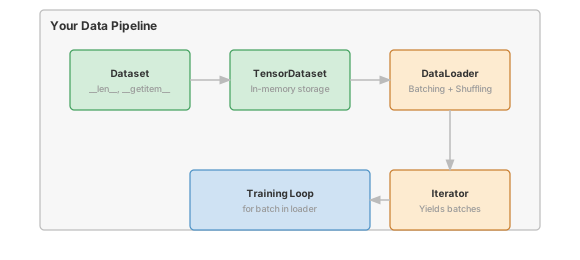
Figure 1: TinyTorch Data Pipeline: From raw dataset storage to training-ready batches.

Implementation roadmap:

Table 1 lays out the implementation in order, one part at a time.

Table 1: Implementation roadmap for the Dataset and DataLoader classes.
Step What You’ll Implement Key Concept
1 Dataset abstract base class Universal data access interface
2 TensorDataset(Dataset) Tensor-based in-memory storage
3 DataLoader.__init__() Store dataset, batch size, shuffle flag
4 DataLoader.__iter__() Index shuffling and batch grouping
5 DataLoader._collate_batch() Stack samples into batch tensors

The pattern you’ll enable:

# Transform individual samples into training-ready batches
dataset = TensorDataset(features, labels)
loader = DataLoader(dataset, batch_size=32, shuffle=True)

for batch_features, batch_labels in loader:
    # batch_features: (32, feature_dim) - ready for model.forward()
    predictions = model(batch_features)

What You’re NOT Building (Yet)

To keep this module focused, you will not implement:

  • Multi-process data loading (PyTorch uses num_workers for parallel loading)
  • Automatic dataset downloads (you’ll use pre-downloaded data or write custom loaders)
  • Prefetching mechanisms (loading next batch while GPU processes current batch)
  • Custom collation functions for variable-length sequences (that’s for NLP modules)

You are building the batching foundation. Parallel loading optimizations come later.

API Reference

This section provides a quick reference for the data loading classes you’ll build. Use it while implementing to verify signatures and expected behavior.

Dataset (Abstract Base Class)

class Dataset(ABC):
    @abstractmethod
    def __len__(self) -> int

    @abstractmethod
    def __getitem__(self, idx: int)

The Dataset interface enforces two requirements on all subclasses:

Table 2 lists the methods you need to implement.

Table 2: Required methods on the Dataset abstract base class.
Method Returns Description
__len__() int Total number of samples in dataset
__getitem__(idx) Sample Retrieve sample at index idx (0-indexed)

TensorDataset

TensorDataset(*tensors)

Wraps one or more tensors into a dataset where samples are tuples of aligned tensor slices.

Constructor Arguments:

  • *tensors: Variable number of Tensor objects, all with same first dimension

Behavior:

  • All tensors must have identical length in dimension 0 (sample dimension)
  • Returns tuple (tensor1[idx], tensor2[idx], ...) for each sample

DataLoader

DataLoader(dataset, batch_size, shuffle=False)

Wraps a dataset to provide batched iteration with optional shuffling.

Constructor Arguments:

  • dataset: Dataset instance to load from
  • batch_size: Number of samples per batch
  • shuffle: Whether to randomize sample order each iteration

Core Methods:

Table 3 lists the methods you need to implement.

Table 3: Core methods on the DataLoader class.
Method Returns Description
__len__() int Number of batches (ceiling of samples divided by batch_size)
__iter__() Iterator Returns generator yielding batched tensors
_collate_batch(batch) Tuple[Tensor, ...] Stacks list of samples into batch tensors

Data Augmentation Transforms

RandomHorizontalFlip(p=0.5)
RandomCrop(size, padding=4)
Compose(transforms)

Transform classes for data augmentation during training. Applied to individual samples before batching.

RandomHorizontalFlip:

  • p: Probability of flipping (0.0 to 1.0)
  • Flips images horizontally along width axis with given probability

RandomCrop:

  • size: Target crop size (int for square, tuple for (H, W))
  • padding: Pixels to pad on each side before cropping
  • Standard augmentation for CIFAR-10: pads to 40×40, crops back to 32×32

Compose:

  • transforms: List of transform callables to apply sequentially
  • Chains multiple transforms into a pipeline

Core Concepts

This section explains the fundamental ideas behind efficient data loading. Understanding these concepts is essential for building and debugging ML training pipelines.

Dataset Abstraction

The Dataset abstraction separates how data is stored from how it’s accessed. This separation enables the same DataLoader code to work with data stored in files, databases, memory, or even generated on-demand.

The interface is deliberately minimal: __len__() returns the count and __getitem__(idx) retrieves a specific sample. A dataset backed by 50,000 JPEG files implements the same interface as a dataset with 50,000 tensors in RAM. The DataLoader doesn’t care about implementation details.

Here’s the complete abstract base class from your implementation:

class Dataset(ABC):
    """Abstract base class for all datasets."""

    @abstractmethod
    def __len__(self) -> int:
        """Return the total number of samples in the dataset."""
        pass

    @abstractmethod
    def __getitem__(self, idx: int):
        """Return the sample at the given index."""
        pass

The @abstractmethod decorator forces every subclass to implement both methods. Calling Dataset() raises TypeError, which is what you want — there is no useful default.

A minimal interface is also a composable one. A caching wrapper, a subset slicer, and a concatenation of two datasets all satisfy __len__ and __getitem__, so they all plug into the same DataLoader without knowing or caring how the underlying samples are stored.

Batching Mechanics

Batching transforms individual samples into the stacked tensors that GPUs process efficiently. When you call dataset[0], you might get (features: (784,), label: scalar) for an MNIST digit. When you call next(iter(dataloader)), you get (features: (32, 784), labels: (32,)). The DataLoader collected 32 individual samples and stacked them along a new batch dimension.

Here’s how collation happens in your implementation:

The code in ?@lst-05-dataloader-collate makes this concrete.

def _collate_batch(self, batch: List[Tuple[Tensor, ...]]) -> Tuple[Tensor, ...]:
    """Collate individual samples into batch tensors."""
    if len(batch) == 0:
        return ()

    # Determine number of tensors per sample
    num_tensors = len(batch[0])

    # Group tensors by position
    batched_tensors = []
    for tensor_idx in range(num_tensors):
        # Extract all tensors at this position
        tensor_list = [sample[tensor_idx].data for sample in batch]

        # Stack into batch tensor
        batched_data = np.stack(tensor_list, axis=0)
        batched_tensors.append(Tensor(batched_data))

    return tuple(batched_tensors)

: Listing 5.1 — _collate_batch stacking per-position samples into contiguous batch tensors. {#lst-05-dataloader-collate}

The algorithm: for each position in the sample tuple (features, labels, etc.), collect all samples’ values at that position, then stack them using np.stack() along axis 0. The result is a batch tensor where the first dimension is batch size.

Consider the memory transformation. Five individual samples might each be a (784,) tensor consuming 3 KB. After collation, you have a single (5, 784) tensor consuming 15 KB. The data is identical, but the layout is now batch-friendly: all 5 samples are contiguous in memory, enabling efficient vectorized operations.

Shuffling and Randomization

Shuffling prevents the model from learning the order of training data rather than actual patterns. Without shuffling, a model sees identical batch combinations every epoch, creating correlations between gradient updates.

The naive implementation would load all samples, shuffle the data array, then iterate. But this requires memory proportional to dataset size. Your implementation is smarter: it shuffles indices, not data.

Here’s the shuffling logic from your __iter__ method:

The code in ?@lst-05-dataloader-iter makes this concrete.

def __iter__(self) -> Iterator:
    """Return iterator over batches."""
    # Create list of indices
    indices = list(range(len(self.dataset)))

    # Shuffle if requested
    if self.shuffle:
        random.shuffle(indices)

    # Yield batches
    for i in range(0, len(indices), self.batch_size):
        batch_indices = indices[i:i + self.batch_size]
        batch = [self.dataset[idx] for idx in batch_indices]

        # Collate batch
        yield self._collate_batch(batch)

: Listing 5.2 — DataLoader __iter__ permuting indices and yielding batches lazily via a generator. {#lst-05-dataloader-iter}

The key insight: random.shuffle(indices) permutes a list of integers, not the underlying data. For 50,000 samples, that’s 400 KB of indices instead of potentially gigabytes of images. The samples never move; only the access order changes.

A fresh shuffle each epoch means sample 42 and sample 1337 land in the same batch in epoch 1 but different batches in epoch 2. That decorrelation is what makes mini-batch SGD an unbiased estimator of the full-dataset gradient — without it, the model can fit the order of the data instead of the data itself.

The total cost is 8 bytes × dataset_size. One million samples costs 8 MB to shuffle, paid once per epoch. The shuffle itself is O(n) time, also paid once per epoch — never per batch.

Iterator Protocol and Generator Pattern

Python’s iterator protocol enables for batch in dataloader syntax. When Python encounters this loop, it first calls dataloader.__iter__() to get an iterator object. Your __iter__ method is a generator function (contains yield), so Python automatically creates a generator that produces values lazily.

Here’s the complete implementation showing the generator pattern:

def __iter__(self) -> Iterator:
    """Return iterator over batches."""
    # Create list of indices
    indices = list(range(len(self.dataset)))

    # Shuffle if requested
    if self.shuffle:
        random.shuffle(indices)

    # Yield batches - this is a generator function
    for i in range(0, len(indices), self.batch_size):
        batch_indices = indices[i:i + self.batch_size]
        batch = [self.dataset[idx] for idx in batch_indices]

        # Collate batch
        yield self._collate_batch(batch)

Each next() call resumes the generator, runs until the next yield, hands back a batch, and pauses there. The function’s local state — indices, i, the loop variable — survives between yields, so no batch state leaks back into the caller and no caller state leaks forward into the next batch.

That laziness is the whole memory argument. At any instant, only the current batch is alive: the previous one is unreachable, the next one does not yet exist. Iterating 1,000 batches of 32 images costs the memory of 32 images, not 32,000 — a 1,000× reduction for a one-line change in API design.

The same protocol also makes infinite datasets free. A synthetic-data __getitem__ can return a sample for any integer index, and the generator will happily yield batches forever. The training loop decides when to stop; the dataset never has to know.

Memory-Efficient Loading

The combination of Dataset abstraction and DataLoader iteration creates a memory-efficient pipeline regardless of dataset size.

For in-memory datasets like TensorDataset, all data is preloaded, but DataLoader still provides memory benefits by controlling how much data is active at once. Your training loop processes one batch, computes gradients, updates weights, then discards that batch before loading the next. Peak memory is batch_size × sample_size, not dataset_size × sample_size.

For disk-backed datasets, the benefits are dramatic. Consider an ImageDataset that loads JPEGs on-demand:

class ImageDataset(Dataset):
    def __init__(self, image_paths, labels):
        self.image_paths = image_paths  # Just file paths (tiny memory)
        self.labels = labels

    def __len__(self):
        return len(self.image_paths)

    def __getitem__(self, idx):
        # Load image only when requested
        image = load_jpeg(self.image_paths[idx])
        return Tensor(image), Tensor(self.labels[idx])

When DataLoader calls dataset[idx], the image is loaded at that moment, not at construction. Once the batch is consumed, the references go out of scope and the memory is reclaimed. That is why a 100 GB dataset can train on an 8 GB machine — only one batch lives in memory at a time.

This is the payoff for separating length from access. The dataset can announce that it holds 50,000 images without holding them; the DataLoader pulls exactly the indices it needs for the current batch and nothing more. Storage size and working-set size become independent.

However, this elegant on-demand loading creates a catastrophic performance cliff. Fetching data sequentially exactly when the GPU requests it introduces severe latency. The data must travel a long, slow path: from the hard disk to system RAM, then across the PCIe bus, and finally into the GPU’s VRAM. While this journey happens, the GPU—capable of trillions of operations per second—sits entirely idle, starved of data.

NoteSystems Implication: The I/O Bottleneck & PyTorch Solutions

To prevent the GPU from sitting idle while data makes the long journey from Disk → RAM → PCIe → VRAM, modern DataLoaders employ asynchrony and memory pinning. In PyTorch, practitioners solve this hardware bottleneck using two key parameters:

  1. num_workers: Uses multiple background processes to pre-fetch and decode the next batch while the GPU computes the current one. PyTorch uses processes rather than threads because the Python GIL (Global Interpreter Lock) prevents multiple threads from executing Python code in parallel.
  2. pin_memory=True: Allocates data in page-locked (pinned) system RAM. This enables the PCIe controller to perform direct memory access (DMA) transfers to the GPU VRAM much faster, without CPU intervention.

Together, multi-processing bypasses the GIL and pinning accelerates PCIe transfers, keeping the data pipeline flowing fast enough to feed the beastly GPU.

Common Errors

These are the most frequent mistakes encountered when implementing and using data loaders.

Mismatched Tensor Dimensions

Error: ValueError: All tensors must have same size in first dimension

This happens when you try to create a TensorDataset with tensors that have different numbers of samples:

features = Tensor(np.random.randn(100, 10))  # 100 samples
labels = Tensor(np.random.randn(90))         # 90 labels - MISMATCH!
dataset = TensorDataset(features, labels)    # Raises ValueError

The first dimension is the sample dimension. If features has 100 samples but labels has 90, TensorDataset cannot pair them correctly.

Fix: Ensure all tensors have identical first dimension before constructing TensorDataset.

Forgetting to Shuffle Training Data

Symptom: Model converges slowly or gets stuck at suboptimal accuracy

Without shuffling, the model sees identical batch combinations every epoch. If your dataset is sorted by class (all cats, then all dogs), early batches are all cats and later batches are all dogs. The model oscillates between cat features and dog features rather than learning a unified representation.

# Wrong - no shuffling means same batches every epoch
train_loader = DataLoader(train_dataset, batch_size=32, shuffle=False)

# Correct - shuffle for training
train_loader = DataLoader(train_dataset, batch_size=32, shuffle=True)
# But don't shuffle validation - you want consistent evaluation
val_loader = DataLoader(val_dataset, batch_size=32, shuffle=False)

Fix: Always shuffle training data, never shuffle validation or test data.

Assuming Fixed Batch Size

Symptom: Index errors or shape mismatches on last batch

If your dataset has 100 samples and batch_size=32, you get batches of size [32, 32, 32, 4]. The last batch is smaller because 100 is not divisible by 32. Code that assumes every batch has exactly 32 samples will fail on the last batch.

def train_step(batch):
    features, labels = batch
    # Wrong - assumes batch_size=32
    assert features.shape[0] == 32  # Fails on last batch!

    # Correct - get actual batch size
    batch_size = features.shape[0]

Fix: Always derive batch size from tensor shape, never hardcode it.

Index Out of Bounds

Error: IndexError: Index 100 out of range for dataset of size 100

This happens when trying to access an index that doesn’t exist. Remember that Python uses 0-indexing: valid indices for a dataset of size 100 are 0 through 99, not 1 through 100.

Fix: Ensure index range is 0 <= idx < len(dataset).

Production Context

Your Implementation vs. PyTorch

Your DataLoader and PyTorch’s torch.utils.data.DataLoader share the same conceptual design and interface. The differences are in advanced features and performance optimizations.

Table 4 places your implementation side by side with the production reference for direct comparison.

Table 4: Feature comparison between TinyTorch DataLoader and PyTorch DataLoader.
Feature Your Implementation PyTorch
Interface Dataset + DataLoader Identical pattern
Batching Sequential in main process Parallel with num_workers
Shuffling Index-based, O(n) Same algorithm
Collation np.stack() in Python Custom collate functions supported
Prefetching None Loads next batch during compute
Memory One batch at a time Configurable buffer with workers

Code Comparison

The following comparison shows identical usage patterns between TinyTorch and PyTorch. Notice how the APIs mirror each other exactly.

from tinytorch.core.dataloader import TensorDataset, DataLoader

# Create dataset
features = Tensor(X_train)
labels = Tensor(y_train)
dataset = TensorDataset(features, labels)

# Create loader
train_loader = DataLoader(
    dataset,
    batch_size=32,
    shuffle=True
)

# Training loop
for epoch in range(num_epochs):
    for batch_features, batch_labels in train_loader:
        predictions = model(batch_features)
        loss = loss_fn(predictions, batch_labels)
        loss.backward()
        optimizer.step()
from torch.utils.data import TensorDataset, DataLoader

# Create dataset
features = torch.tensor(X_train)
labels = torch.tensor(y_train)
dataset = TensorDataset(features, labels)

# Create loader
train_loader = DataLoader(
    dataset,
    batch_size=32,
    shuffle=True,
    num_workers=4  # Parallel loading
)

# Training loop
for epoch in range(num_epochs):
    for batch_features, batch_labels in train_loader:
        predictions = model(batch_features)
        loss = loss_fn(predictions, batch_labels)
        loss.backward()
        optimizer.step()

There is exactly one substantive difference: PyTorch accepts num_workers=4, which spawns four worker processes that load batches in parallel and hand them back through a queue. Dataset construction and the training loop are byte-for-byte identical because they have to be — the iterator protocol is the contract, not a particular implementation of it.

TipWhat’s Identical

The Dataset abstraction, DataLoader interface, and batching semantics are identical. When you understand TinyTorch’s data pipeline, you understand PyTorch’s data pipeline. The only difference is PyTorch adds parallel loading to hide I/O latency.

Why DataLoaders Matter at Scale

To see why this infrastructure earns its keep, look at production-scale training:

  • ImageNet training: 1.2M images at 224×224×3 = 600 GB uncompressed
  • Batch memory: batch_size=256 × 150 KB per JPEG ≈ 38 MB per batch
  • I/O throughput: Reading 38 MB from SSD at 500 MB/s ≈ 76 ms per batch of disk I/O alone

A forward+backward pass on the same batch takes about 50 ms on a modern GPU. Without overlap, the GPU is idle more than half of every step waiting for bytes that have not arrived yet.

Production solutions:

  • Prefetching: Load batch N+1 while GPU processes batch N (PyTorch’s num_workers)
  • Data caching: Keep decoded images in RAM across epochs (eliminates JPEG decode overhead)
  • Faster formats: Use LMDB or TFRecords instead of individual files (reduces filesystem overhead)

Your DataLoader provides the interface that enables these optimizations. Add num_workers, swap TensorDataset for a disk-backed dataset, and the training loop code stays identical.

Check Your Understanding

TipCheck Your Understanding — DataLoader

Before moving on, verify you can articulate each of the following:

If any of these feels fuzzy, revisit Core Concepts (Dataset Abstraction, Shuffling and Randomization, Iterator Protocol and Generator Pattern, Memory-Efficient Loading) before moving on.

The collapsible Q&A below grounds each point in concrete ImageNet/CIFAR-scale numbers.

Q1: Memory Calculation

You’re training on CIFAR-10 with 50,000 RGB images (32×32×3 pixels, float32). What’s the memory usage for batch_size=128?

Each image: 32 × 32 × 3 × 4 bytes = 12,288 bytes ≈ 12 KB.

Batch of 128 images: 128 × 12 KB = 1,536 KB ≈ 1.5 MB.

That is the floor — input bytes only. Add activations, gradients, and parameters and peak memory typically lands 50–100× higher. The takeaway: batch size sets the baseline, and everything else scales from it.

Q2: Throughput Analysis

Your training reports these timings per batch:

  • Data loading: 45 ms
  • Forward pass: 30 ms
  • Backward pass: 35 ms
  • Optimizer step: 10 ms

Total: 120 ms per batch. Where’s the bottleneck? How much faster could training be if you eliminated data loading overhead?

Data loading takes 45 ms out of 120 ms = 37.5% of total time.

If data loading were free (perfect prefetching, hot cache), total time drops to 30+35+10 = 75 ms per batch.

Speedup: 120 ms → 75 ms = 1.6× faster training from a single fix.

This is why production systems prefetch with num_workers: the CPU loads batch N+1 while the GPU computes batch N, and the I/O wall-time disappears under the compute.

Q3: Shuffle Memory Overhead

You’re training on a dataset with 10 million samples. How much extra memory does shuffle=True require compared to shuffle=False?

Index array: 10,000,000 × 8 bytes = 80 MB.

That is the entire overhead. The samples themselves never move.

If each sample is 10 KB, the dataset is 100 GB. Shuffling 100 GB of data costs 80 MB of indices — 0.08% overhead. This is why every production loader shuffles indices, never bytes.

Q4: Batch Size Trade-offs

You’re deciding between batch_size=32 and batch_size=256 for ImageNet training:

  • batch_size=32: 14 hours training, 76.1% accuracy
  • batch_size=256: 6 hours training, 75.8% accuracy

Which would you choose for a research experiment where accuracy is critical? Which for a production job where you train 100 models per day?

Research (accuracy critical): batch_size=32

  • 14 hours is acceptable for research (run overnight)
  • 76.1% vs 75.8% = 0.3% accuracy gain might be significant for publication
  • Smaller batches often generalize better (noisier gradients act as regularization)

Production (throughput critical): batch_size=256

  • 6 hours vs 14 hours = 2.3× faster, enabling 100 models to train in reasonable time
  • 0.3% accuracy difference is negligible for many production applications
  • Can try learning rate adjustments to recover accuracy while keeping speed

Systems insight: Batch size creates a three-way trade-off between training speed, memory usage, and model quality. The “right” answer depends on your bottleneck: time, memory, or accuracy.

Q5: Collation Cost

Your DataLoader collates batches using np.stack(). For batch_size=128 with samples of shape (3, 224, 224), how much data is copied during collation?

Each sample: 3 × 224 × 224 × 4 bytes = 602,112 bytes ≈ 588 KB.

Batch of 128 samples: 128 × 588 KB = 75,264 KB ≈ 73.5 MB.

np.stack() allocates a new contiguous buffer of that size and copies all 128 samples into it. At a memory bandwidth of 20 GB/s, the copy takes ~3.7 milliseconds.

Larger batches pay a higher absolute collation cost (more bytes to move) but a lower per-sample cost — one big copy beats 128 small ones because the memory subsystem is happiest moving long, contiguous runs.

Key Takeaways

  • A two-method contract scales to every dataset you will ever meet: __len__ + __getitem__ is enough for the DataLoader to treat in-memory tensors, disk-backed JPEGs, or streaming sources interchangeably.
  • Shuffle indices, never bytes: permuting an 8-byte integer array is O(n) and essentially free; permuting the data array costs dataset-sized I/O and defeats the whole point of batching.
  • Generators keep peak memory at one batch: yield pauses the iterator between batches, so only the current batch is alive — which is how a 100 GB dataset trains on an 8 GB machine.
  • Collation exists to make batches contiguous: np.stack produces a single flat buffer the GPU can stream, turning 128 scattered samples into one cache-friendly tensor.
  • The I/O wall is the real enemy at scale: without prefetching, the GPU stalls at 50% utilization waiting for Disk → RAM → PCIe → VRAM; num_workers + pin_memory are what make that latency disappear.

Coming next: Module 06 builds automatic differentiation on top of this iterator — every batch tensor the DataLoader yields becomes a leaf of a computation graph that loss.backward() traces back to fill param.grad for every weight.

Further Reading

As models grew from millions to billions of parameters, the bottleneck in training shifted from simply computing gradients to keeping the monstrous hardware fed with data. The following papers illustrate how the ML community realized that data infrastructure, augmentation, and batching strategies are just as critical to model convergence as the architecture itself.

Seminal Papers

  • ImageNet Classification with Deep Convolutional Neural Networks - Krizhevsky et al. (2012). The AlexNet paper that popularized large-scale image training and highlighted data augmentation as essential for generalization. Systems Implication: The model had to be split across two GTX 580 GPUs because of the strict 3GB VRAM limit, while data augmentation pipelines introduced severe CPU bottlenecking during data loading. NeurIPS

  • Accurate, Large Minibatch SGD - Goyal et al. (2017). Facebook AI Research paper exploring how to scale batch size to 8192 while maintaining accuracy, revealing the relationship between batch size, learning rate, and convergence. arXiv:1706.02677

  • Mixed Precision Training - Micikevicius et al. (2018). NVIDIA paper showing how batch size interacts with numerical precision for memory and speed trade-offs. arXiv:1710.03740

Additional Resources

  • Engineering Blog: “PyTorch DataLoader Internals” — Detailed explanation of multi-process loading and prefetching strategies
  • Documentation: PyTorch Data Loading Tutorial - See how production frameworks extend the patterns you’ve built

What’s Next

NoteComing Up: Module 06 - Autograd

You can now move data through a model. You cannot yet learn from it — every batch leaves the network as a loss number with no gradient attached. Module 06 fixes that by building automatic differentiation: every tensor remembers the operations that produced it, and loss.backward() walks the resulting graph to assign a gradient to every parameter the loader’s batch touched.

DataLoader and autograd compose directly: the iterator you just built becomes the input edge of every computation graph in the rest of the book.

Where this DataLoader shows up next:

Table 5 traces how this module is reused by later parts of the curriculum.

Table 5: How the DataLoader feeds into subsequent training modules.
Module What it does Your DataLoader in action
06: Autograd Reverse-mode differentiation Each batch tensor becomes a leaf of the computation graph
08: Training End-to-end training loops for batch in loader: is the outer loop of every example
09: Convolutions Convolutional layers The same iterator now feeds 4-D image batches to CNNs

Get Started

TipInteractive Options
WarningSave Your Progress

Binder sessions are temporary. Download your completed notebook when done, or clone the repository for persistent local work.

Back to top