Module 08: Training
The inner loop is four lines: forward, loss, backward, step. A training system is everything wrapped around it. Schedules, clipping, evaluation modes, and checkpoints are what turn one step() into a million without human babysitting. This is where the framework becomes something you can leave running overnight.
FOUNDATION TIER | Difficulty: ●●○○ | Time: 5-7 hours | Prerequisites: 01-07
This is the capstone of the Foundation Tier. The seven components you built — tensors, activations, layers, losses, dataloader, autograd, optimizers — finally fit together into a Trainer that actually learns.
Overview
Seven modules of components, none of them yet doing anything together. A tensor on its own does not learn. A layer on its own does not learn. Even autograd plus an optimizer does not learn — somebody has to call them, in order, on real data, again and again. That somebody is the training loop, and you are about to build it.
The loop itself is four lines: forward pass, loss, backward pass, optimizer step. Repeat. The hard part is what production wraps around those four lines. Learning rates need to start high and decay. Gradients sometimes explode and need clipping. Long runs crash and need checkpoints to resume from. Models need separate train and evaluation modes so dropout and batch norm behave correctly. By the end of this module you will have a Trainer class that handles all of this — the same architecture PyTorch Lightning and Hugging Face Transformers expose to millions of users, just smaller and yours.
Commands
# first time
tito module start 08

# later sessions
tito module resume 08

# when your tests pass
tito module complete 08
Your notebook is modules/08_training/training.ipynb.
Learning objectives
- Implement the training-epoch loop that drives the forward pass, loss computation, backward pass, and parameter updates
- Master learning rate scheduling with cosine annealing that adapts training speed over time
- Understand gradient clipping by global norm that prevents training instability
- Trace the supplied checkpointing code that saves and restores complete training state for fault tolerance
- Analyze training memory overhead (about 4\(\times\) the parameter bytes with Adam, plus activations) and checkpoint storage costs
What you’ll build
Five pieces wrapped around the inner loop: a learning-rate schedule, a gradient clipper, the training loop itself, an evaluation pass, and checkpoint save/load.
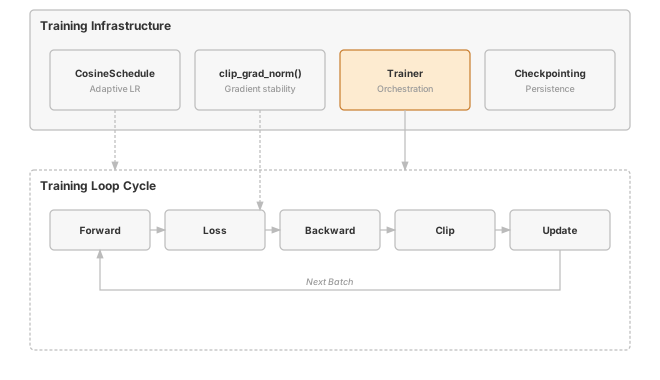
The pattern you’ll enable:
# Complete training pipeline (modules 01-07 working together)
trainer = Trainer(model, optimizer, loss_fn, scheduler, grad_clip_norm=1.0)
for epoch in range(100):
    train_loss = trainer.train_epoch(train_data)
    eval_loss, accuracy = trainer.evaluate(val_data)
    trainer.save_checkpoint(f"checkpoint_{epoch}.pkl")
What you’re not building yet
To keep the module focused, you will not implement:
- Distributed training across multiple GPUs (PyTorch uses
DistributedDataParallel) - Mixed-precision training (PyTorch’s Automatic Mixed Precision relies on dedicated FP16/BF16 tensor types)
- Exotic schedulers — warmup, cyclic, one-cycle, polynomial decay (production frameworks ship dozens)
You are building the core training orchestration. That orchestration is what the rest of the framework plugs into.
What you write
The notebook arrives with the surrounding code already written and explained. You write one function, each marked # YOUR CODE HERE and followed by a test cell:
Trainer.train_epoch- Train for one epoch through the dataset.
How you know it works
tito module complete stops at the first step that fails:
- the unit tests inside your notebook run;
- your code is exported into
tinytorch.core.training; - the integration tests run against that exported package, together with the modules before it;
- the module is recorded as done, and
tito module statusshows it.
Unit tests in your notebook (9). Each prints a ✅ line when it passes.
- CosineSchedule
- Gradient Clipping
- Trainer.__init__
- Trainer._process_batch
- Trainer._optimizer_update
- Trainer.train_epoch
- Trainer.evaluate
- Trainer.save_checkpoint
- Trainer.load_checkpoint
Integration tests after export (16).
tests/08_training/test_08_training_progressive.py
When it fails
A bare NotImplementedError with no message means a cell reached a function you have not written yet: the notebook ships each one as # YOUR CODE HERE followed by raise NotImplementedError(). The messages below are ones this module actually prints when an implementation is present but wrong.
Normalize by the actual tail size-
From
test_unit_trainer_train_epoch. Gradients left over from a final group smaller thanaccumulation_stepswere never applied. After the loop, if batches are pending, callself._optimizer_update(pending_samples). Expected epoch=1, got 0-
From
test_unit_trainer_train_epoch. The epoch counter was not advanced. Incrementself.epochat the end oftrain_epoch; the learning-rate schedule reads it. Should have 1 loss recorded-
From
test_unit_trainer_train_epoch. The epoch’s average loss was not appended toself.history['train_loss'].
Finished? Read why
The reasoning behind this module (why it is built this way, what it costs, and how production frameworks differ) is the chapter The Training Engine: The Five-Step Loop in the companion book, TinyTorch: From Tensors to Transformers (PDF). The book prints complete reference implementations, so read it after you finish the module, not while you are working on it.
What’s next
You just shipped the Foundation Tier. Tensors, autograd, optimizers, dataloader, and a Trainer that ties them together — these are the load-bearing pieces of every modern ML framework, and you wrote all of them. The next tier is about what gets put inside the model. The training loop you built does not change.
Before moving on, the next three chapters give those Foundation pieces their first real workout. The Foundation Milestones — Rosenblatt’s 1958 Perceptron, the 1969 XOR Crisis, and the 1986 MLP Revival — are runnable recreations of the experiments that shaped early neural-network history, moving from your forward-pass stack to the full autograd, optimizer, and Trainer pipeline you just finished. You watch your own code fail in the same way Minsky proved it had to, then break through with the same fix Rumelhart shipped. Then, on the far side, Module 09 opens the Architecture Tier.
First: three Foundation Milestones start with your early layers, expose the XOR limitation, then use your full Trainer for TinyDigits MLP recognition — proof that the framework you built reproduces the history of the field. Then Module 09 opens the Architecture Tier with Conv2d, MaxPool2d, and AvgPool2d: the layers that exploit spatial structure in images and make computer vision possible. Same Trainer.train_epoch() you wrote here will train the CNNs you build there, with no code changes. That’s the payoff of separating orchestration from architecture.
Next: Foundation Milestones, then Module 09: Convolutions
How later modules use this one
| Module | What It Adds | Your Trainer In Action |
|---|---|---|
| 09: Convolutions | Spatial layers for images | Same train_epoch() trains CNNs unchanged |
| Milestone: MLP | Solve XOR and train on TinyDigits | Trainer orchestrates the full pipeline |
| Milestone: CNN | Train a LeNet-style CNN on TinyDigits | Vision models trained with your infrastructure |