The MLSys Zoo
Authoritative ML Systems Specifications
The MLSys Zoo is a centralized, vetted registry of specifications used throughout the mlsysim platform. Every entry is strictly typed with pint.Quantity for dimensional correctness, provenance-tracked, and validated against official sources.
A persistent problem in ML systems literature is spec staleness—people cite outdated or incorrect hardware numbers. The MLSys Zoo fixes this by being the authoritative source for the mlsysim ecosystem. When a spec changes (e.g., NVIDIA publishes an updated datasheet), it is updated once here and propagates automatically to every solver and tutorial.
Catalogs
| Zoo | Description | Key Data | Python Access |
|---|---|---|---|
| Silicon Zoo | AI accelerators from microcontrollers to datacenter GPUs | Peak FLOPs, Memory BW, Capacity, TDP | mlsysim.Hardware.Cloud.A100 |
| Embodied Zoo | Cyber-physical machine platforms and robotic embodiments | Mass, payload, speed, control rate, SoC | mlsysim.Embodied.Quadruped.Spot |
| Agents Zoo | Agent system profiles, deliberation trees, and execution harnesses | Context window, working memory, sandbox latency | mlsysim.Agents.Deliberation.TreeSearch |
| Model Zoo | Reference ML workloads: transformers, CNNs, TinyML | Parameters, Inference FLOPs, Layers | mlsysim.Models.Vision.ResNet50 |
| Fleet Zoo | Nodes, racks, cluster configurations, and deployment tiers | Node type, rack power, count, network fabric | mlsysim.Systems.Racks.DGX_H100_4Node |
| Platforms Zoo | Deployment paradigms (Cloud, Edge, Mobile, TinyML) | Latency range, RAM envelope | mlsysim.Platforms.Cloud.latency_range_ms |
| Infrastructure Zoo | Regional electricity grids and datacenter profiles | Carbon Intensity, PUE | mlsysim.Infrastructure.Grids.Quebec |
| Scenarios Zoo | Workload statistics, comparison anchors, scale profiles, reusable problem settings | Training scale, storage corpus, clinical-imaging, energy and emissions anchors | mlsysim.ReferenceStats.StorageTrainingCorpus.TrainingTokens |
| Literature Zoo | Cited MFU, Chinchilla, batch-size, and communication anchors | Chinchilla, ring AllReduce factor | mlsysim.Literature.Chinchilla.TokensPerParam |
| Ops Zoo | Monitoring, drift thresholds, and operational profiles | PSI, KS, training overhead anchors | mlsysim.Ops.Monitoring.PsiWarnThreshold |
| Datasets Zoo | Canonical dataset sizes for data-scale reasoning | Train/test counts, resolution | mlsysim.Datasets.ImageNet |
| Calibration | Solver/engine knobs (not hardware specs) | Reference MFU, kernel launch latency | mlsysim.engine.calibration.REFERENCE_MFU_SUSTAINED |
System Composition Hierarchy
ML systems are structurally composed of smaller parts. The mlsysim registry reflects this physical reality. Before a workload can be evaluated, the structural components are combined into a coherent system.
Here is how the components in the Zoo relate to each other:
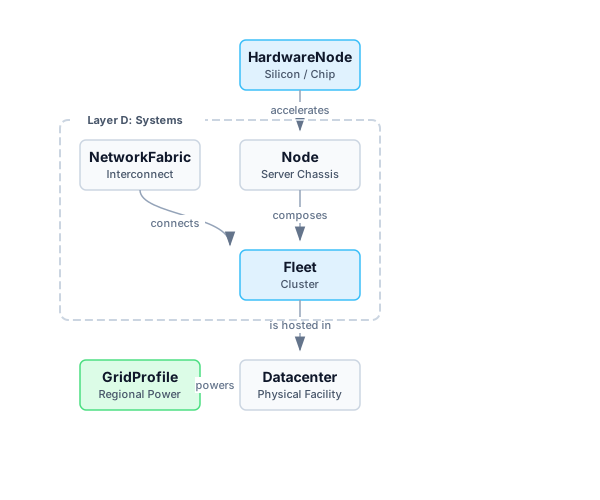
- HardwareNode (Silicon): The fundamental unit of compute (e.g., an H100 GPU or a DGX Spark GB10 superchip). It provides FLOPs and Memory Bandwidth.
- Node: A single server chassis. It contains one or more
HardwareNodes connected by a high-speed intra-node bus (like NVLink). - RackProfile: A physical rack composition. It can aggregate node count, accelerator count, accelerator power, and non-accelerator support power.
- NetworkFabric: The inter-node networking (e.g., InfiniBand NDR or 100GbE) that allows servers to communicate.
- Fleet (Cluster): A collection of
Nodes connected by aNetworkFabric. This is the top-level entity used for distributed training and cluster reliability models. - Datacenter & GridProfile (Infrastructure/Regions): The physical facility and regional power grid that hosts the
Fleet. It dictates the Power Usage Effectiveness (PUE) and the carbon intensity of the electricity consumed.
Accessing Zoo Entries in Code
All Zoo entries follow the same registry pattern:
import mlsysim

# Hardware
a100  = mlsysim.Hardware.Cloud.A100
jetson = mlsysim.Hardware.Edge.JetsonOrinNX

# Models
resnet = mlsysim.Models.Vision.ResNet50
llama  = mlsysim.Models.Language.Llama3_70B

# Infrastructure
quebec = mlsysim.Infrastructure.Grids.Quebec
virginia = mlsysim.Infrastructure.Grids.US_Avg

# Systems (nodes/racks/fleets)
node = mlsysim.Systems.Nodes.DGX_H100
rack = mlsysim.Systems.Racks.DGX_H100_4Node
cluster = mlsysim.Systems.Clusters.Frontier_8K

# Agents & Embodied (Autonomous systems & robotics)
agent_runner = mlsysim.Agents.Coding.SWE_Bench_Runner
agent_platform = mlsysim.Agents.Platforms.Cloud_DGX_H100
robot = mlsysim.Embodied.Quadruped.Spot

# Platforms (deployment paradigms)
cloud_latency = mlsysim.Platforms.Cloud.latency_range_ms
mobile_ram = mlsysim.Platforms.Mobile.ram

# Literature & Ops (cited anchors, not silicon specs)
chinchilla = mlsysim.Literature.Chinchilla.TokensPerParam
psi_warn = mlsysim.Ops.Monitoring.PsiWarnThreshold

# Reusable scenario anchors (problem settings, not physical systems)
corpus_tokens = mlsysim.ReferenceStats.StorageTrainingCorpus.TrainingTokens

# Solver calibration (engine tuning, not zoo hardware)
ref_mfu = mlsysim.engine.calibration.REFERENCE_MFU_SUSTAINEDAll quantities (FLOPs, bandwidth, capacity) are pint.Quantity objects. You can convert between units and MLSys·im will catch dimensional errors at runtime:
hw.compute.peak_flops.to("TFLOPs/s")   # → 312.0 TFLOPs/s
hw.memory.bandwidth.to("TB/s")          # → 2.0 TB/s
hw.memory.bandwidth.to("FLOP/s")        # → pint.DimensionalityError ✓